
نماذج الترجمة بالذكاء الاصطناعي قوية، ولكنها يمكن أن تكون مبدع للغاية. تعمل المسرد كـ "طبقة الحماية"، إجبار محرك الترجمة على الالتزام بقواعد علامتك التجارية المحددة. سواء كان ذلك يضمن "Apple" يبقى اسم علامة تجارية (وليس فاكهة) أو الاحتفاظ بالإخلاءات القانونية حرفيًا، فإن مدير مسرد MultiLipi يمنحك تحكمًا مطلقًا.
يغطي هذا الدليل الطريقتين لتحديد هذه القواعد: إدخال يدوي (دقة) و استيعاب CSV (دفعة واحدة).
فرض اتساق صارم للمصطلحات
تتجاوز المسارد قرارات الترجمة الآلية للحفاظ على سلامة العلامة التجارية. استخدمها لأسماء الشركات، أو رموز المنتجات، أو المصطلحات القانونية، أو المصطلحات التقنية، أو الكلمات الرئيسية ذات القيمة العالية لتحسين محركات البحث التي يجب أن تظل متسقة عبر جميع اللغات.
الوصول إلى قاعدة المصطلحات
المسرد هو إعداد عام ينطبق على جميع مشاريعك.
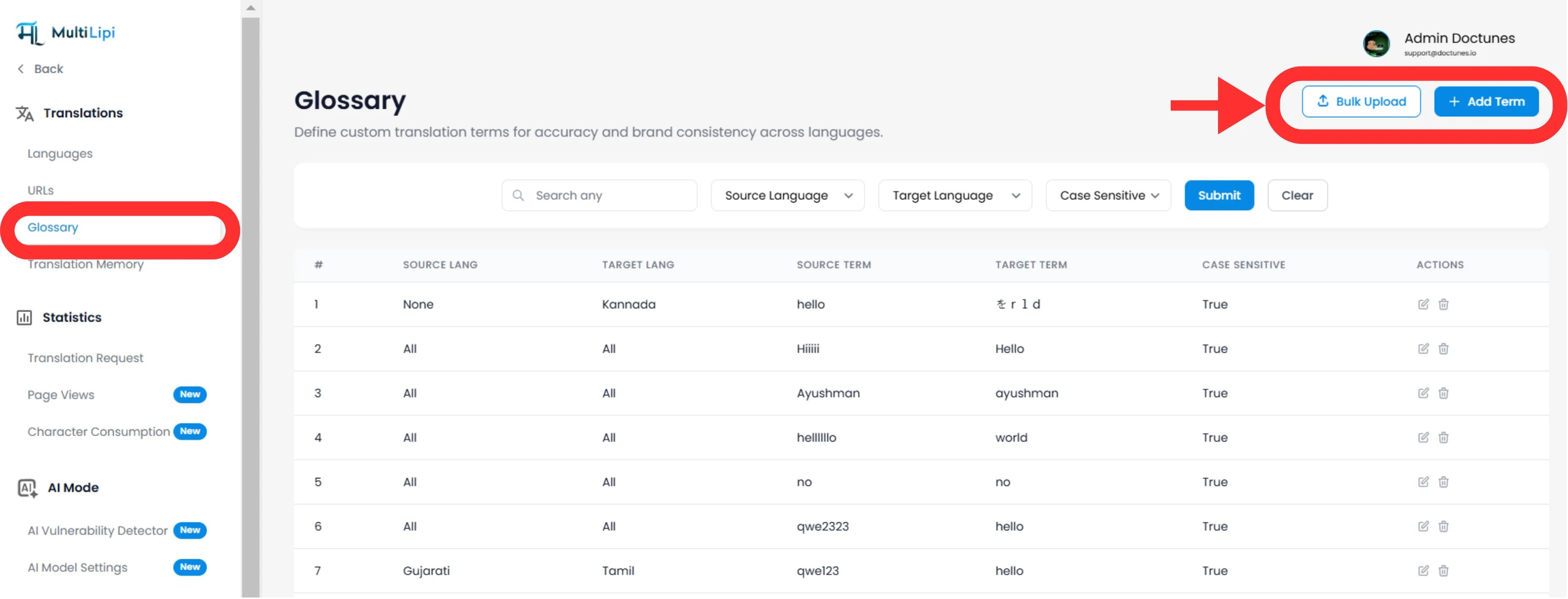
انتقل إلى: من لوحة تحكم MultiLipi الخاصة بك، قم بتوسيع الترجمات القائمة في الشريط الجانبي.
تحديد: انقر مسرد المصطلحات.
عرض: سترى جدولاً قابلاً للبحث لجميع القواعد النشطة، وأزواج لغاتها، وحالة حساسية الأحرف.
الطريقة الأولى: تعريف قاعدة الدقة (يدوي)
الأفضل لـ:
تثبيت أسماء العلامات التجارية، ورموز تعريف المنتجات، وشعارات التسويق المحددة.
بدء
انقر فوق جديد الزر في الزاوية العلوية اليمنى.
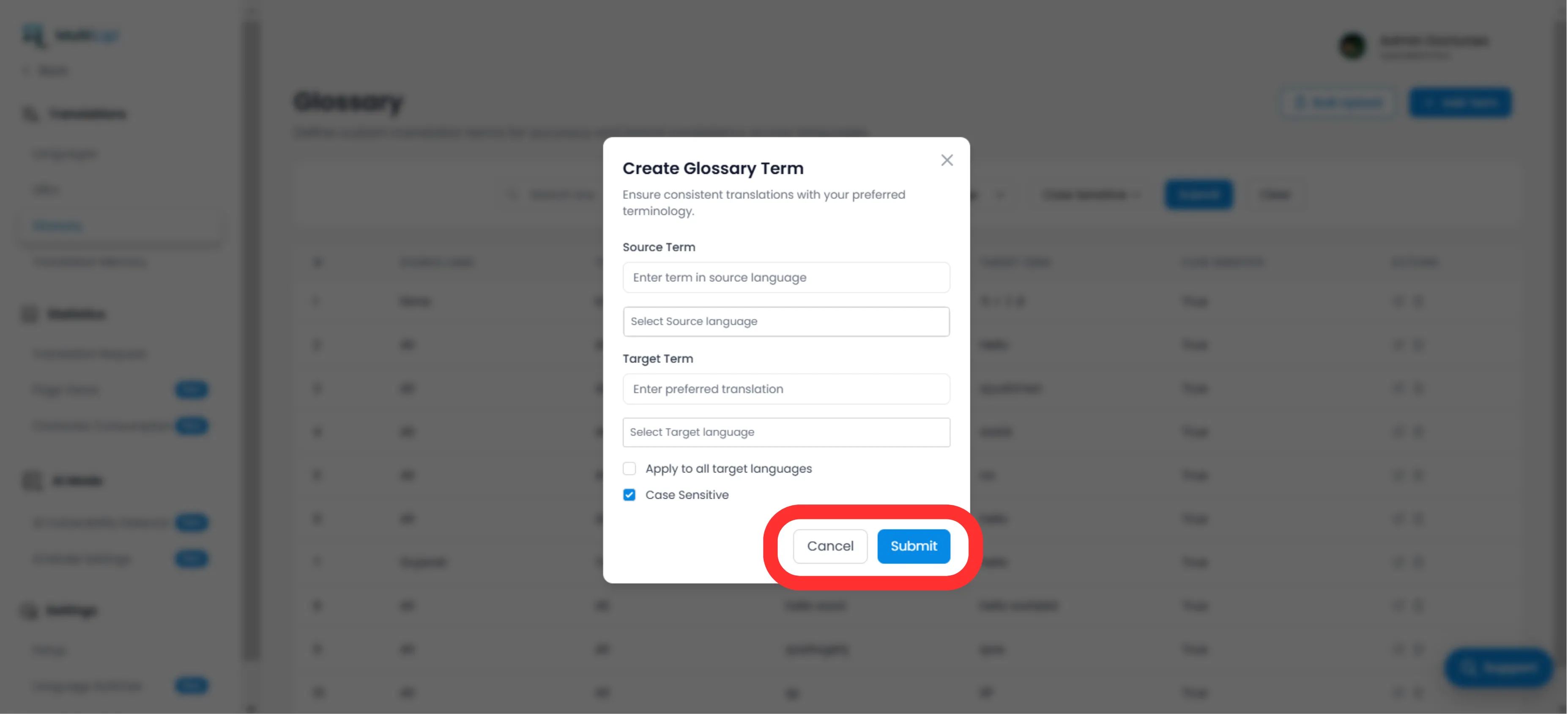
تحديد القاعدة
مصطلح المصدر
الكلمة أو العبارة الدقيقة بلغتك الأصلية (على سبيل المثال، "CloudDrive").
المصطلح المستهدف
الترجمة الإلزامية (على سبيل المثال، "CloudDrive" - للاحتفاظ بها باللغة الإنجليزية، أو "Le CloudDrive").
نطاق اللغة
محدد
ينطبق فقط على EN → FR.
عام
تحديد "جميع اللغات" لتثبيت اسم علامة تجارية في جميع أنحاء العالم.
حساسية حالة الأحرف
ممكّن
مطابقات "Apple" لكن يتجاهل "apple". أساسي للكلمات الشائعة التي هي أيضًا أسماء علم.
نشر
انقر إرسال. القاعدة هي تم دفعه فورًا لمحرك الترجمة وسيتم تطبيقه على جميع الترجمات المستقبلية.
الطريقة 2: الاستيعاب بالجملة (تحميل CSV)
الأفضل لـ:
ترحيل قواعد المصطلحات القديمة، أو القواميس القانونية، أو قوائم منتجات التجارة الإلكترونية.
إذا كان لديك مئات المصطلحات، لا تدخلها يدويًا. استخدم لدينا أداة استيراد CSV.
جهز بياناتك
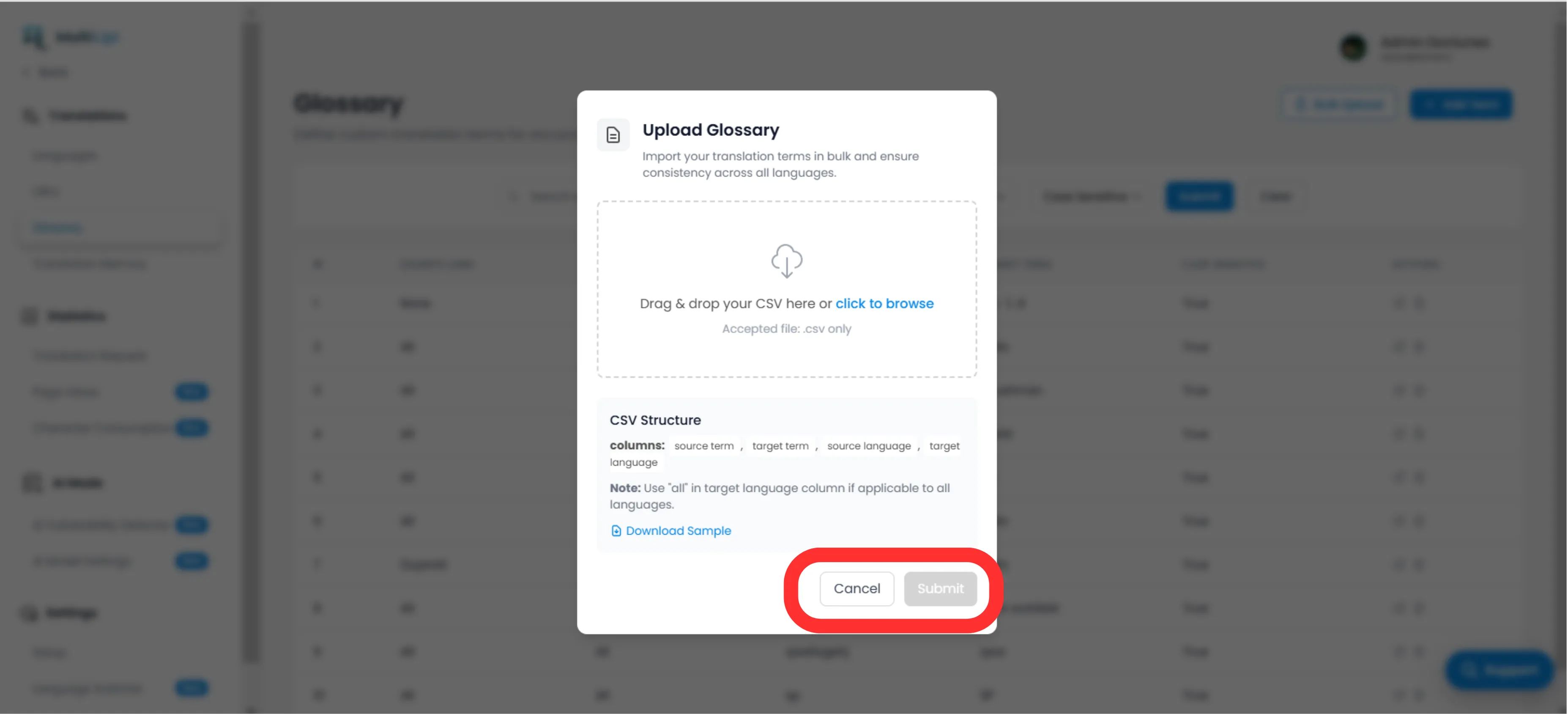
أنشئ ملف CSV بالهيكل التالي للرأس:
مصطلح المصدر، مصطلح الهدف، لغة المصدر، لغة الهدفملاحظة
استخدم رموز ISO للغات (على سبيل المثال، en, الفرنسية, الألمانية). استخدم كل للقواعد العامة.
تحميل
انقر فوق تحميل زر في لوحة المسرد.
تعيين والتحقق
حدد ملفك. سيقوم النظام تحليل الصفوف وتمييز أي أخطاء في التنسيق.
تنفيذ
انقر إرسال لاستيعاب القواعد في قاعدة المصطلحات النشطة الخاصة بك.
أفضل الممارسات الاستراتيجية
اقفل علامتك التجارية
القاعدة الأولى التي يجب إنشاؤها هي لـ اسم الشركة. قم بتعيين الهدف ليكون مطابق للمصدر وطبقها على كل اللغات.
كلمات مفتاحية لتحسين محركات البحث
إذا كنت تستهدف لغة معينة كلمة رئيسية عالية الحجم في ألمانيا (على سبيل المثال، "مفيد" بدلاً من "Mobiltelefon")، قم بإنشاء قاعدة مسرد لإجبار المحرك على استخدام المصطلح الأعلى زيارة.
اجعلها قصيرة
تعمل المسارد بشكل أفضل لـ عبارات من 1-3 كلمات. لا تستخدمها للجمل بأكملها؛ استخدم ذاكرة الترجمة or المحرر المرئي لذلك.
هل أنت مستعد لفرض تناسق العلامة التجارية؟ افتح مدير المسرد وابدأ في تحديد حواجز الترجمة الخاصة بك اليوم.