
في البنية التحتية العالمية، الأول الثاني زيارة المستخدم أمر بالغ الأهمية. إذا وصل مستخدم ألماني إلى صفحتك الرئيسية الإنجليزية، فسيواجه صعوبة. MultiLipi's مُعيد توجيه لغة الزائر يقضي على هذا من خلال العمل كمنظم مرور ذكي. يقوم بفحص رؤوس الطلبات الواردة ويوجه الزائر فورًا إلى النسخة المحلية من موقعك التي تتطابق مع تفضيلات متصفحه.
هذا الدليل يفصل بروتوكول التكوين وخوارزميات التوجيه المستخدمة لإدارة هذه التدفقات.
1. بنية الكشف
كيف يعرف المحرك من يزور.
يعمل مُعيد التوجيه بناءً على تدفق منطقي صارم بناءً على Accept-Language رأس HTTP الذي ترسله كل متصفحات الويب الحديثة.
الاستجواب:
يهبط زائر على موقعك.com.
تحليل:
يقرأ المحرك قائمة أولوية لغة المتصفح (مثل fr-FR، en-US).
مطابقة:
يقوم بفحص اللغات النشطة لمشروعك.
تم العثور على تطابق:
يتم إعادة توجيه المستخدم فورًا إلى /fr/ باستخدام إعادة توجيه 302.
لا يوجد تطابق:
يبقى المستخدم على اللغة الافتراضية (المصدر).
2. بروتوكول التكوين
قم بتمكين طبقة التوجيه الآلية هذه مباشرة من إعدادات مشروعك.
الخطوة 1: الوصول إلى لوحة تحكم المشروع
تسجيل الدخول إلى لوحة تحكم MultiLipi.
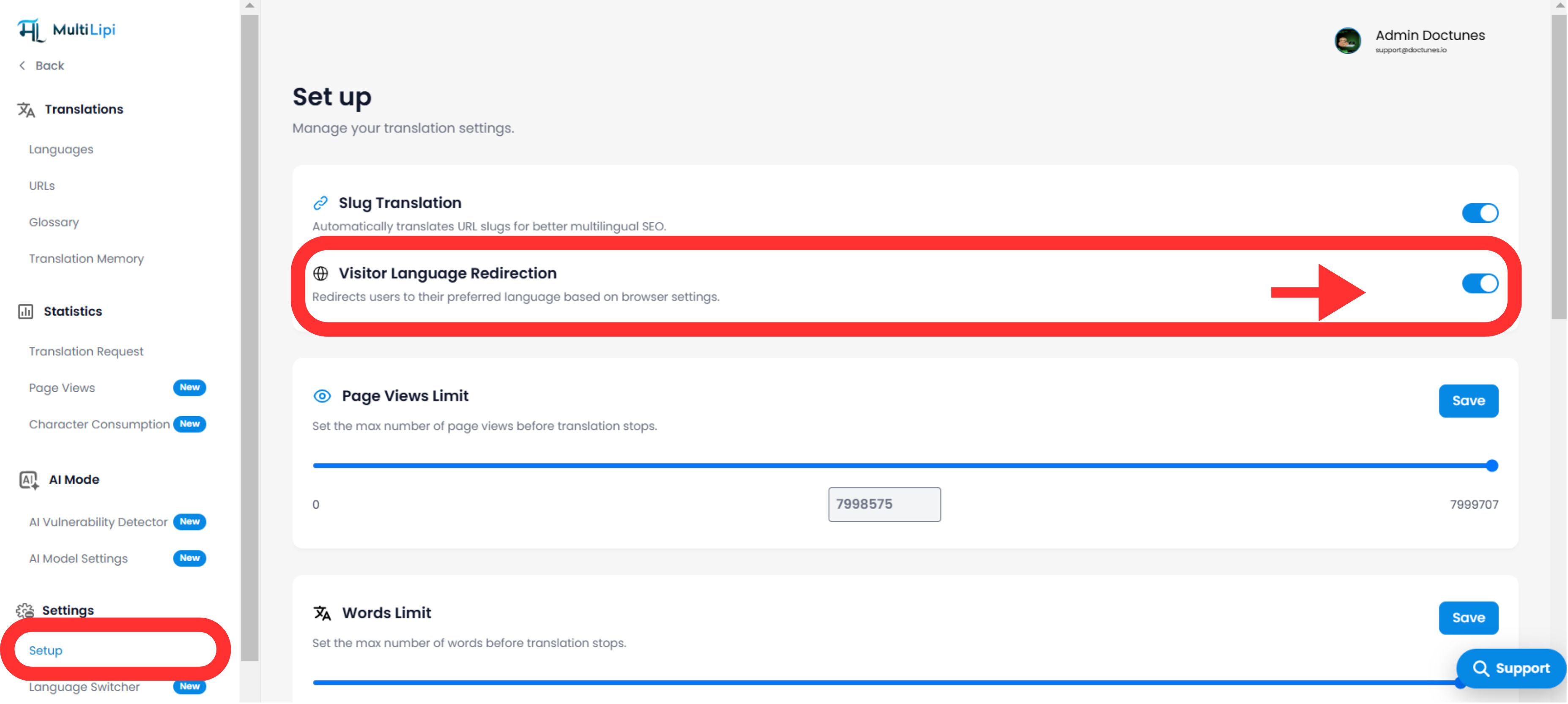
الخطوة 2: الانتقال إلى الإعداد
- •انتقل إلى الإعدادات في الشريط الجانبي الأيسر.
- •تحديد إعداد من القائمة الفرعية.
الخطوة 3: تفعيل الوحدة
- •قم بالتمرير لأسفل للعثور على مُعيد توجيه لغة الزائر كتلة الميزة.
- •الإجراء: قم بتبديل المفتاح إلى
تشغيل. - •الحالة: نشط: سيبدأ محرك التوجيه فورًا في تصفية وإعادة توجيه حركة المرور الجديدة.
محرك التوجيه مفعل
3. طبقة الثبات (تجاوز ملف تعريف الارتباط)
الموازنة بين الأتمتة وتحكم المستخدم.
الخوف الشائع مع إعادة التوجيه التلقائي هو حصر المستخدمين في اللغة الخاطئة (على سبيل المثال، إنجليزي في باريس يستخدم جهاز كمبيوتر فرنسي). MultiLipi يحل هذه المشكلة باستخدام ملف تعريف الارتباط ذو الأولوية.
المنطق:
إذا تمت إعادة توجيه المستخدم تلقائيًا إلى الفرنسية ولكنه استخدم يدويًا محول اللغة للعودة إلى الإنجليزية، فإننا نضبط ملف تعريف الارتباط الثابت.
النتيجة:
في زيارتهم التالية، يقوم النظام يحترم اختياره اليدوي بناءً على إعدادات المتصفح الخاصة بهم. يتم دائما في السيطرة.
4. توافق SEO والفهرسة
حماية ميزانية الزحف الخاصة بك.
تم تصميم هذه الميزة لتكون صديق لمحركات البحث.
توافق Hreflang:
يعمل جنبًا إلى جنب مع hreflang علامات لضمان فهم جوجل للعلاقة بين صفحاتك.
سلوك الروبوت:
معظم روبوتات البحث تزحف دون تحديد Accept-Language الرؤوس أو يتم التعامل معها على أنها "محايدة"، مما يضمن أنها لا تزال قادرة على الوصول إلى المحتوى الافتراضي الخاص بك وفهرسته دون الوقوع في حلقة إعادة توجيه.
5. بروتوكول التحقق
كيفية اختبار المسار.
للتحقق من أن أداة إعادة التوجيه تعمل:
تكوين المتصفح:
انتقل إلى إعدادات المتصفح لديك (Chrome/Firefox) وقم بتغيير لغتك المفضلة إلى لغة تدعمها (مثل الفرنسية).
مسح ملفات تعريف الارتباط:
افتح نافذة متصفح خفية/خاصة (لتجاوز ملف تعريف الارتباط الثابت المذكور في القسم 3).
قم بزيارة:
أدخل عنوان URL الرئيسي الخاص بك (yoursite.com).
الملاحظة:
يجب أن يتم توجيهك تلقائيًا إلى yoursite.com/fr/.
مؤشر النجاح:
إذا تغير عنوان URL في متصفحك ليشمل رمز اللغة المستهدف (مثل /fr/)، فإن أداة إعادة توجيه لغة الزائر هي يعمل بشكل مثالي.