
التعاون ضروري للتوسع العالمي، ولكن أمن البيانات له الأولوية القصوى. MultiLipi's مساحة عمل الفريق يتيح لك توفير الوصول للمترجمين والمطورين ومديري المشاريع دون مشاركة بيانات اعتماد تسجيل الدخول الحساسة. يمكنك تعيين أذونات مفصلة ، مع ضمان تفاعل أعضاء الفريق فقط مع المشاريع والأدوات المحددة المطلوبة لدورهم.
يغطي هذا المخطط دورة حياة إدارة المستخدم: التزويد , التدقيق ، و إلغاء التزويد .
التحكم في الوصول المستند إلى الأدوار (RBAC)
لا تشارك بيانات اعتمادك الرئيسية أبدًا. بدلاً من ذلك، قم بإنشاء حسابات فردية بأذونات مصممة خصيصًا لمسؤوليات كل مستخدم. يضمن هذا مسارات تدقيق كاملة والقدرة على إلغاء الوصول فورًا عند انتقال أعضاء الفريق.
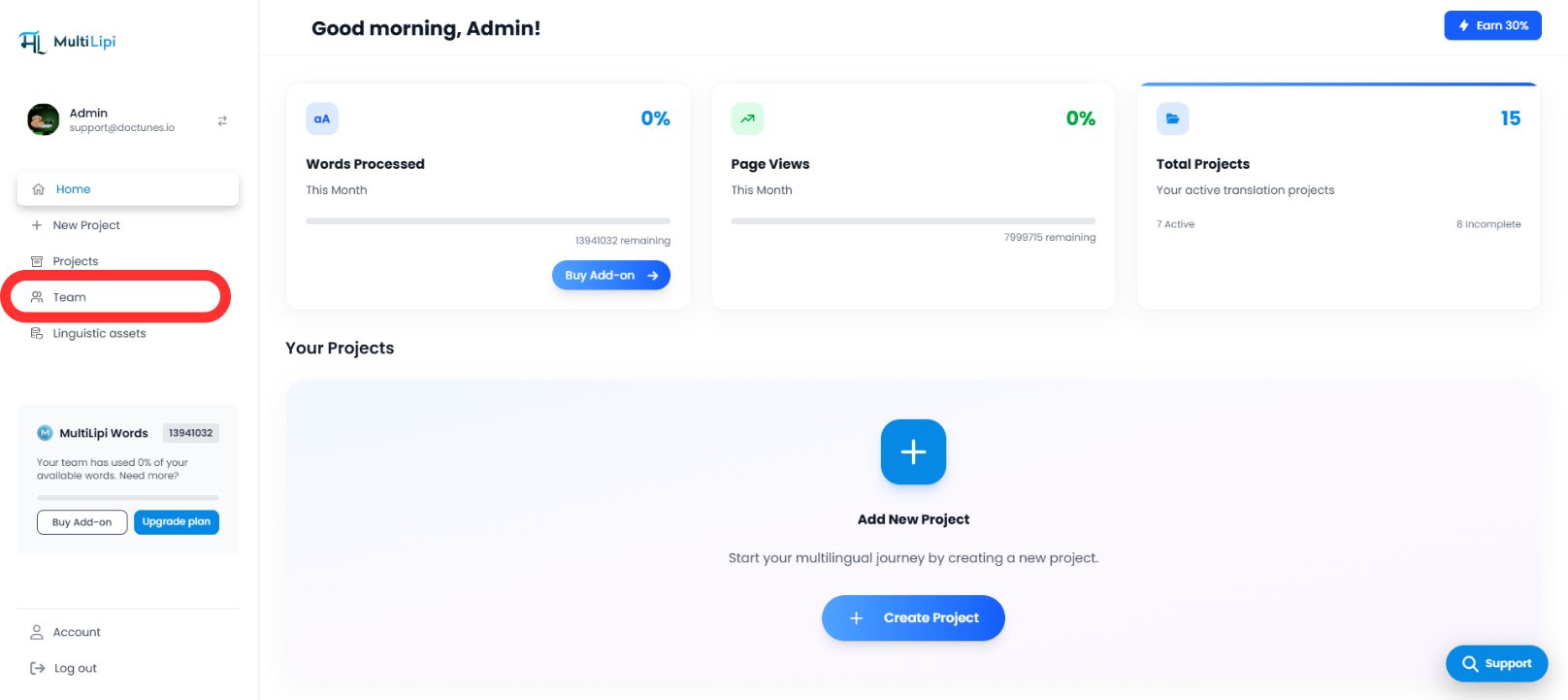
1. الوصول إلى دليل الفريق
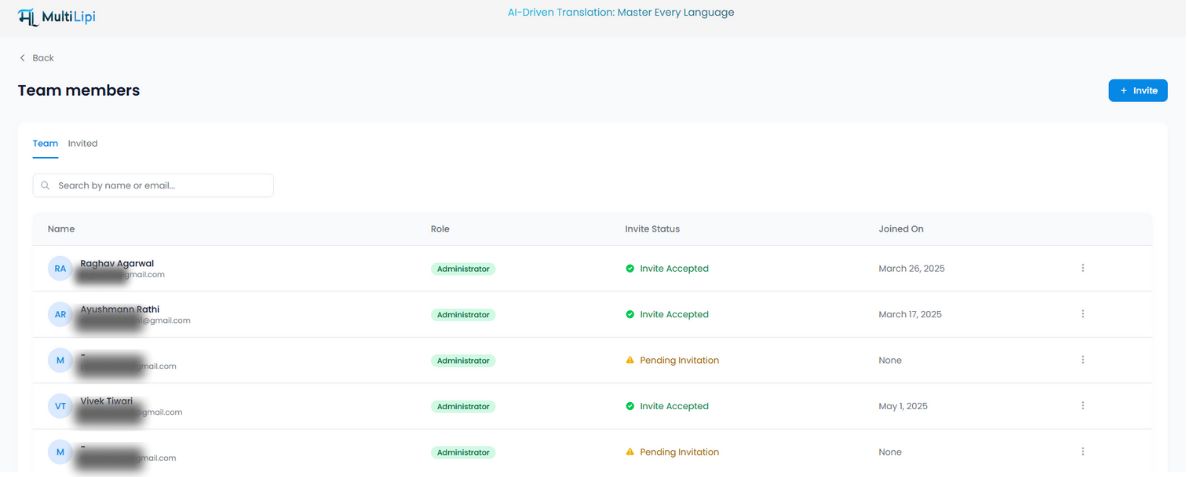
يعمل تبويب الفريق كمركز قيادة مركزي لجميع أذونات المستخدم.
انتقل
من الشريط الجانبي للوحة تحكم MultiLipi الخاصة بك، حدد فريق .
عرض التدقيق
سترى جدولًا موحدًا يسرد جميع المستخدمين النشطين، وأدوارهم المعينة، ونطاق الوصول (مجالات محددة)، والحالة الحالية ( نشط مقابل دعوة معلقة ).
2. توفير الوصول (دعوة الأعضاء)
لإشراك متعاون جديد:
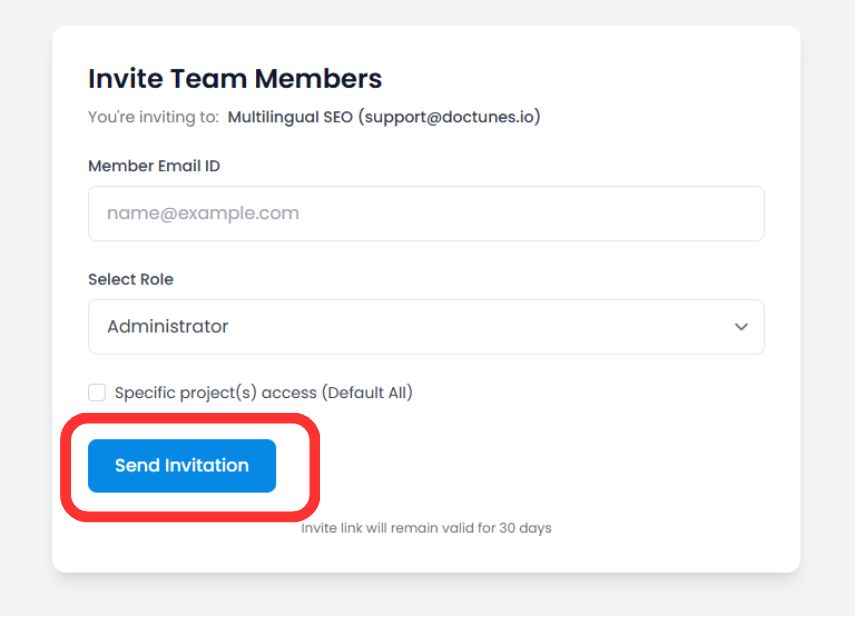
بدء الدعوة
انقر فوق دعوة الزر في الزاوية العلوية اليمنى من مساحة العمل.
تحديد بيانات الاعتماد
بريد إلكتروني
أدخل عنوان البريد الإلكتروني للشركة للمستخدم.
تعيين الدور
حدد مستوى الامتياز المناسب (على سبيل المثال، مسؤول للتحكم الكامل، مساهم لتحرير الترجمة فقط).
نطاق المشروع (اختياري)
تقييد المستخدم لمجالات محددة (على سبيل المثال، تعيين "مترجم أ" لمشروع اللغة الألمانية فقط).
نشر الدعوة
انقر دعوة عبر البريد الإلكتروني .
ملاحظة أمنية
تنتهي صلاحية رابط الدعوة الآمن تلقائيًا في 30 يومًا لمنع الوصول غير المصرح به من الروابط القديمة.
3. إدارة دورات حياة الوصول
الحوكمة عملية مستمرة. يمكنك تعديل الأذونات أو إلغائها فورًا مع تغير هياكل الفريق.
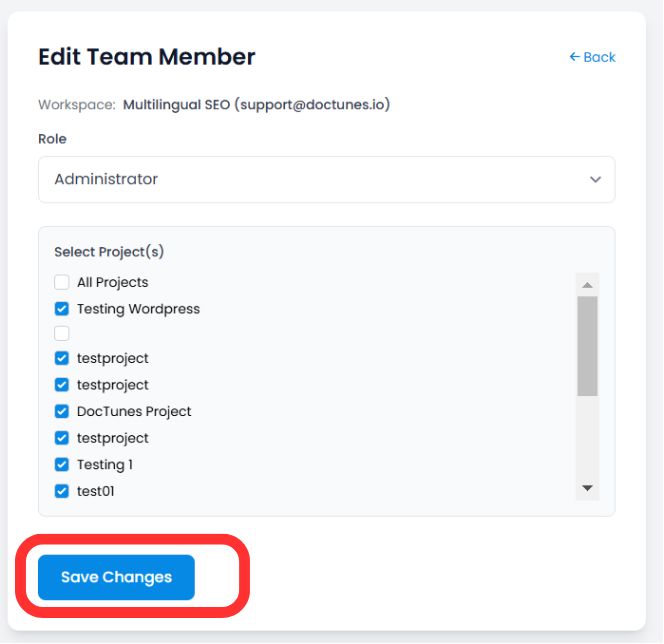
تعديل الأدوار (وظيفة "تحرير")
إذا احتاج المستخدم إلى صلاحيات مرتفعة أو الوصول إلى مشروع جديد:
حدد موقع المستخدم في فريق جدول.
انقر فوق ثلاث نقاط (⋮) أيقونة في عمود الإجراءات.
تحديد تعديل .
تحديث دور or تعيين المشروع وانقر على حفظ التغييرات . تنطبق الأذونات الجديدة فورًا.
إلغاء الوصول (إنهاء الخدمة)
عند مغادرة عضو فريق أو انتهاء عقد، قم بتأمين حسابه فورًا:
الخطوة 1
انقر فوق أيقونة سلة المهملات/الحذف في عمود الإجراءات.
الخطوة 2
تأكيد الإزالة.
تأثير
يتم إنهاء جلسة المستخدم، ويفقد الوصول إلى لوحة التحكم فورًا .
الملخص: أفضل ممارسات التعاون
| إجراء | أفضل ممارسة |
|---|---|
| تعيين الدور | استخدم مبدأ الامتياز الأقل . امنح صلاحيات المسؤول فقط لأصحاب المصلحة الموثوق بهم. |
| تحديد نطاق المشروع | عزل الوكالات الخارجية لمشاريع محددة لمنعها من عرض بيانات غير ذات صلة. |
| عمليات تدقيق دورية | مراجعة علامة تبويب الفريق شهريًا لإزالة المستخدمين غير النشطين أو الدعوات المعلقة. |
🔒 الأمان على نطاق واسع: من خلال تطبيق RBAC المفصل، فإنك تضمن أن عمليات الترجمة الخاصة بك يمكن أن تتوسع عالميًا دون المساس بسلامة البيانات أو تعريض معلومات المشروع الحساسة لأعضاء الفريق غير المصرح لهم.