
1. بروتوكول التدقيق
الخطوة 1: الوصول إلى سياق المشروع
تسجيل الدخول إلى لوحة تحكم MultiLipi الخاصة بك.
في الشريط الجانبي الأيسر، ضمن الترجمات القسم، انقر فوق مشروعك الحالي لفتح إعداداته المحددة.
الخطوة 2: الوصول إلى خريطة التوجيه
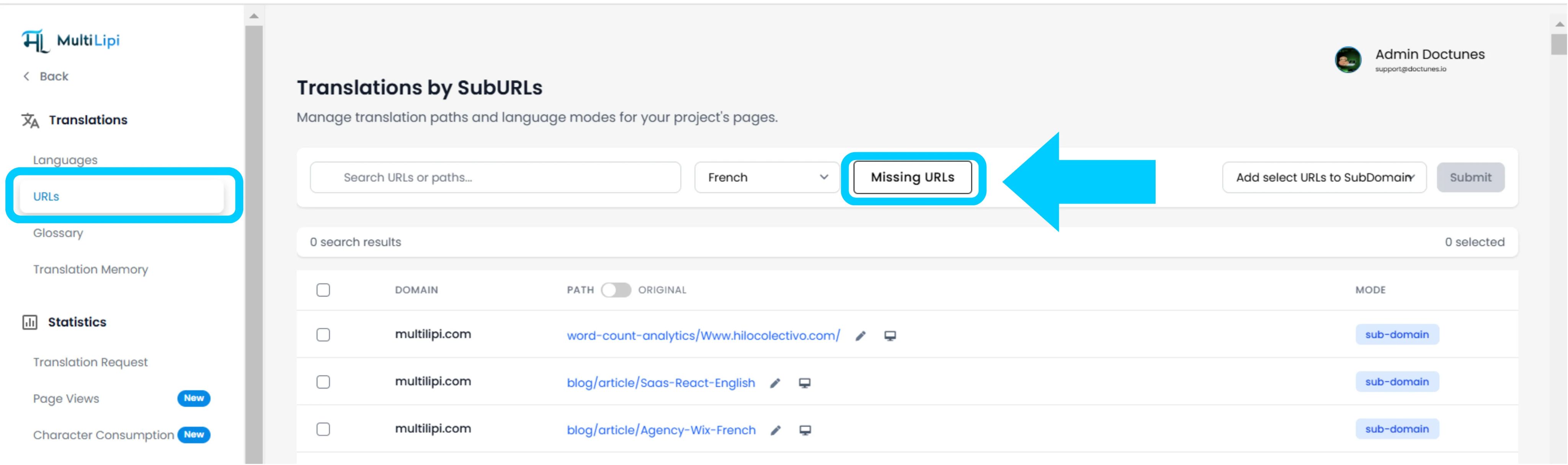
داخل عرض المشروع، انقر على عناوين URL خيار في الشريط الجانبي.
السياق: يعرض هذا الجزء سجل بجميع المسارات التي يتم تتبعها وترجمتها حاليًا.
الخطوة 3: تحديد السياق المستهدف
حدد موقع القائمة المنسدلة بجوار شريط البحث.
الإجراء: حدد اللغة المحددة التي ترغب في تدقيقها (على سبيل المثال، الفرنسية).
المنطق: سيقوم النظام الآن بمقارنة فهرس المصدر (الإنجليزية) مقابل الفهرس الفرنسي.
الخطوة 4: تنفيذ المسح
انقر فوق عناوين URL المفقودة زر.
إجراء النظام: يقوم المحرك بمسح نطاق المصدر الخاص بك بحثًا عن المسارات الصالحة غير الموجودة في خريطة اللغة الحالية.
2. الاستيعاب والمزامنة
ملخص التدقيق
يعرض العدد الإجمالي للمسارات غير المترجمة التي تم العثور عليها.
قائمة المسارات
قائمة مفصلة بكل عنوان URL محدد (على سبيل المثال، /blog/new-feature) التي تفتقر إليها اللغة المستهدفة.
بروتوكول الإصلاح
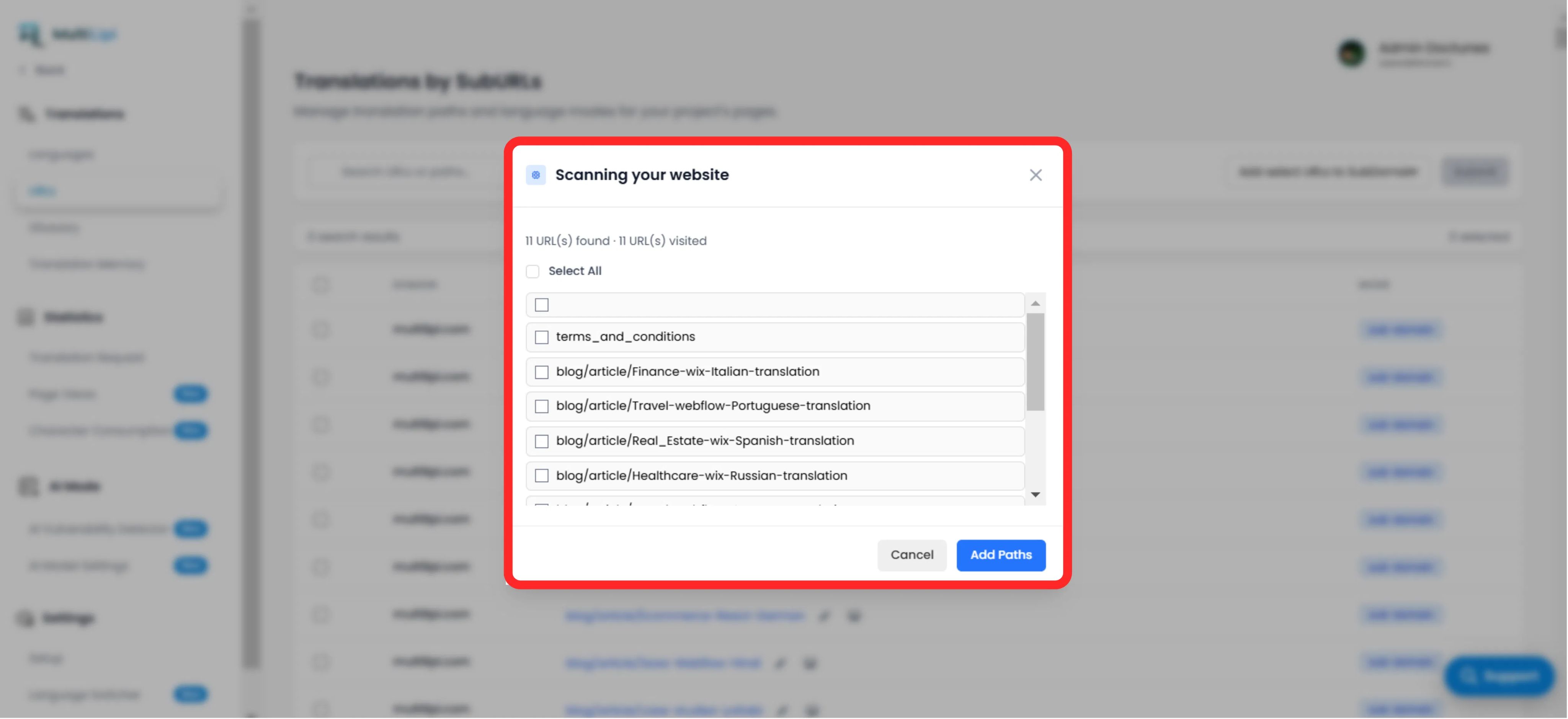
الاختيار: تحقق يدويًا من المربعات للصفحات المحددة، أو انقر فوق "تحديد الكل" لمزامنة الدفعة بأكملها.
التزام: انقر فوق الزر "إضافة مسارات".
النتيجة: تتم إضافة عناوين URL هذه على الفور إلى قائمة انتظار الترجمة. سيقوم النظام الآن بإنشاء الإصدارات المحلية والسماح بحركة المرور بالوصول إليها.
3. الفوائد الاستراتيجية
تغطية تحسين محركات البحث
لا يمكن لمحركات البحث فهرسة الصفحات غير الموجودة. يضمن إضافة عناوين URL هذه أن يقوم Google بفهرسة موقعك بالكامل باللغة الفرنسية، وليس فقط الصفحة الرئيسية.
منع نهاية الطريق المسدود
يضمن أنه إذا قام المستخدم بتبديل اللغات في صفحة عميقة، فلن يتم إرجاعه إلى الصفحة الرئيسية بسبب عدم وجود الترجمة المحددة.
الاكتشاف الآلي
يلغي الحاجة إلى جداول البيانات اليدوية لتتبع منشورات المدونة التي تمت ترجمتها.
نصيحة احترافية
بعد استيعاب المسارات الجديدة، انتقل إلى وضع الذكاء الاصطناعي > كاشف الثغرات لتشغيل فحص فوري لصحة تحسين محركات البحث (SEO) لهذه الصفحات التي تم إنشاؤها حديثًا لضمان تحسينها للإطلاق.