

التوسع في منطقة جديدة يتطلب أكثر من مجرد ترجمة؛ إنه يتطلب تفانيًا هياكل عناوين URL, فهرسة محركات البحث، و شبكات توصيل المحتوى. يقوم MultiLipi بتجريد هذه التعقيدات، مما يتيح لك نشر (أو إيقاف) نقاط نهاية لغة كاملة على الفور من لوحة التحكم الخاصة بك.
يغطي هذا الدليل دورة حياة اللغة: التزويد, التكوين (الخطوط/RTL)، و إلغاء الخدمة.
توفير السوق بنقرة واحدة
على عكس إضافات الترجمة التقليدية التي تتطلب تكوينًا يدويًا لكل لغة جديدة، يقوم MultiLipi تلقائيًا بتوفير جميع البنية التحتية اللازمة: الدلائل الفرعية أو النطاقات الفرعية، وعلامات hreflang، وإدخالات خريطة موقع XML، والبيانات الوصفية المترجمة - كل ذلك بنقرة واحدة.
1. التوفير (إضافة لغة)
إطلاق سوق جديد في ثوانٍ.
عندما تضيف لغة، يقوم MultiLipi بتوفير اللازم فورًا الدلائل الفرعية مثلًا، /de/) أو النطاقات الفرعية مثلًا، de.site.com) ويؤدي إلى تشغيل محرك الترجمة العصبية لبدء فهرسة المحتوى الخاص بك.
بروتوكول النشر
البنية التحتية للوصول
انتقل إلى الترجمات > اللغات في الشريط الجانبي للوحة التحكم الخاصة بك.
بدء النشر
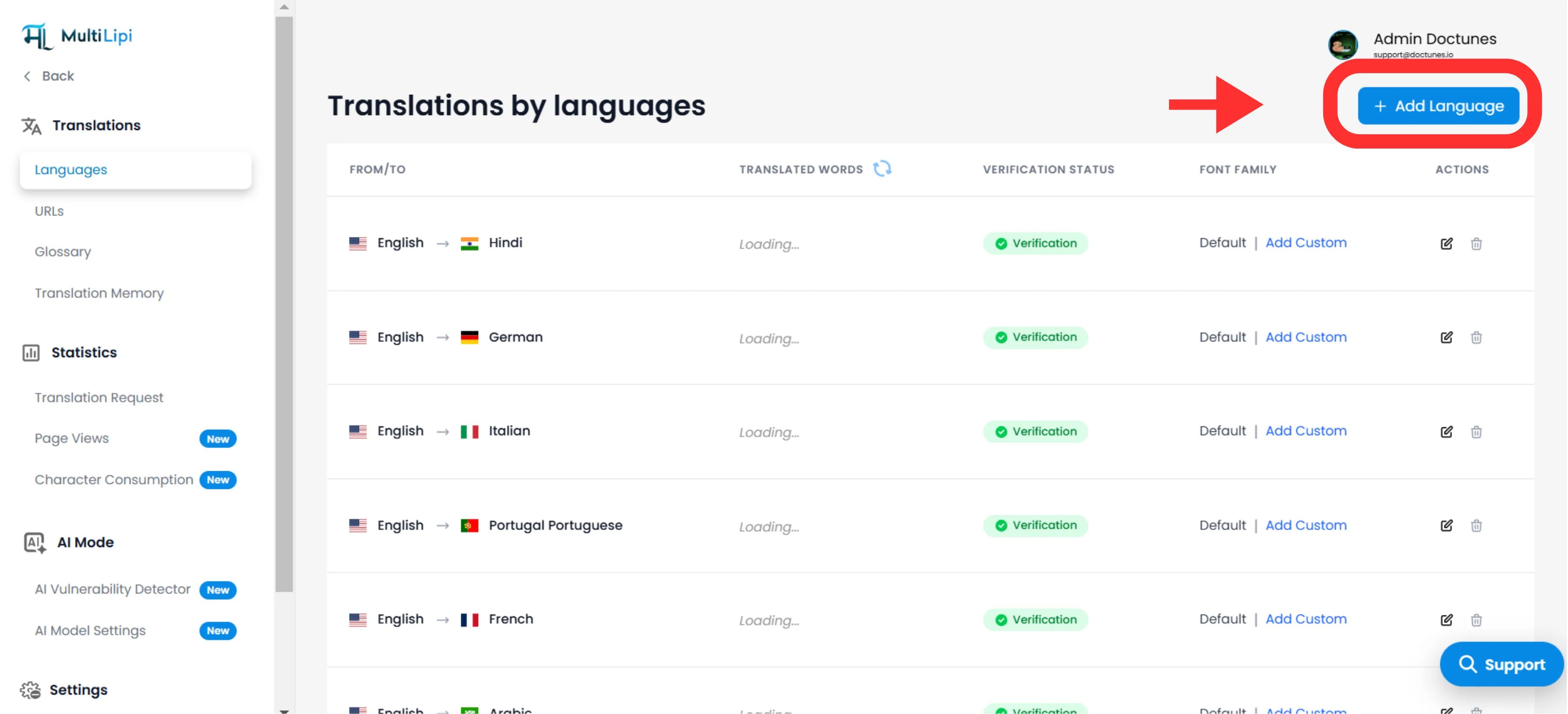
انقر إضافة لغة في الزاوية العلوية اليمنى.
تحديد المنطقة
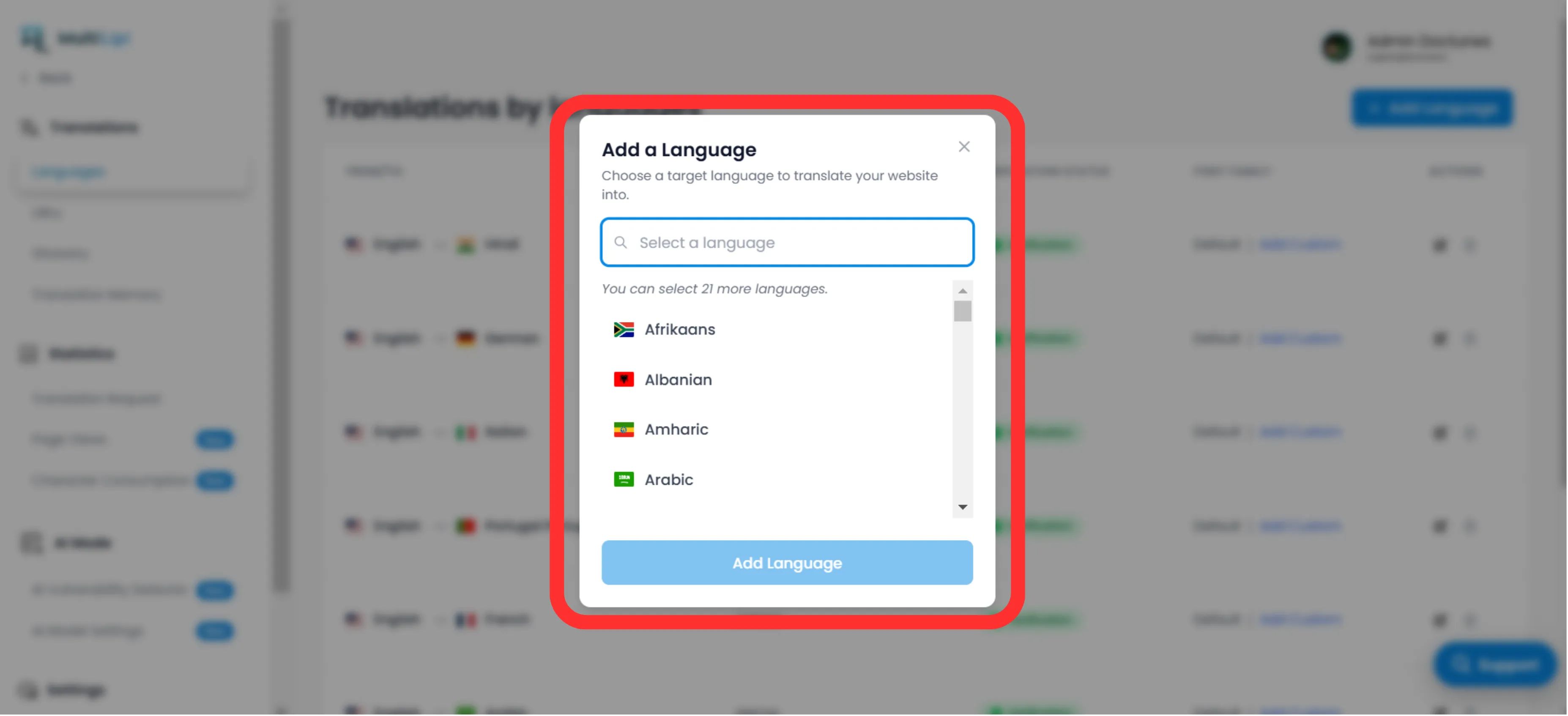
اختر من بين 100+ لغة مدعومة.
ملاحظة استراتيجية
كن محددًا. اختيار الإسبانية (المكسيك) مقابل الإسبانية (إسبانيا) سيؤدي ذلك إلى تغيير علامات hreflang واستهداف SEO الخاص بك.
تنفيذ
انقر إضافة. نقطة النهاية متاحة الآن، ويبدأ الفهرسة فورًا.
2. الإعداد والترجمة
ضمان الوضوح عبر النصوص.
نشر اللغة هو الخطوة الأولى فقط. يجب عليك التأكد من أن النص يتم عرضه بشكل صحيح للمستخدمين المحليين.
الطباعة (عائلة الخط)
تتطلب اللغات المختلفة وزنًا بصريًا مختلفًا. في شبكة اللغات، استخدم "عائلة الخط" العمود لتعيين خطوط ويب محددة.
مثال
استخدم 'Noto Sans JP' للغة اليابانية لضمان تعريف واضح للحروف، مع الحفاظ على 'Inter' للغة الإنجليزية.
الاتجاهية (دعم RTL)
لأسواق مثل الشرق الأوسط (العربية, العبرية, فارسي)، يكتشف MultiLipi تلقائيًا اللغة المحلية ويقلب تخطيط CSS الخاص بك إلى من اليمين إلى اليسار (RTL). لا يلزم ترميز يدوي.
الكشف التلقائي: عند إضافة العربية أو العبرية أو الفارسية، يطبق النظام تلقائيًا dir="rtl" لضمان تدفق النص المناسب وانعكاس التخطيط.
3. إلغاء الخدمة (إزالة لغة)
إنهاء الأسواق ضعيفة الأداء بفعالية.
إذا لم تعد منطقة ما استراتيجية، أو كنت بحاجة إلى استعادة حصة الترجمة، يمكنك إلغاء تفعيل اللغة.
تحديد نقطة النهاية
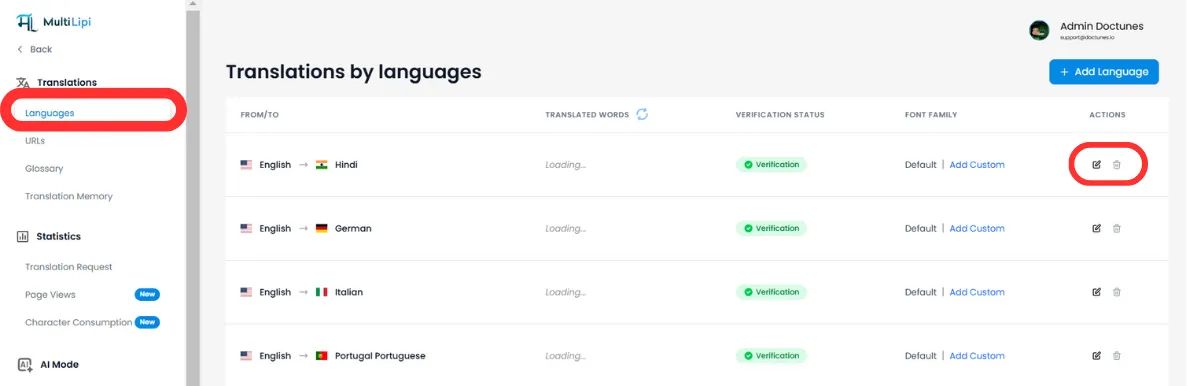
في اللغات اللوحة، ابحث عن الصف المستهدف.
تنفيذ الإزالة
انقر فوق أيقونة سلة المهملات/الحذف في عمود الإجراءات.
تأكيد
⚠️ تحذير حرج
إزالة لغة يقتل نقطة النهاية فورًا. أي حركة مرور إلى /fr/ (على سبيل المثال) سيؤدي إلى خطأ 404. إذا كانت هذه اللغة تحتوي على صفحات مفهرسة، نوصي بإعداد عمليات إعادة التوجيه 301 على مستوى الخادم الخاص بك قبل الحذف.
الملخص: تأثير البنية التحتية
| إجراء | تأثير تحسين محركات البحث | تأثير الحصة |
|---|---|---|
إضافة لغة | ينشئ جديدًا علامات hreflang & إدخالات خريطة الموقع XML. | يستهلك الحصة التخزينية عند زيارة الصفحات وفهرستها. |
إزالة اللغة | عناوين URL هي تم إلغاء فهرستها بواسطة جوجل بمرور الوقت. | يحرر الحصة التراخيصية للترجمات المستقبلية. |
🌍 إدارة اللغة الاستراتيجية: على عكس المنافسين الذين يتطلبون إعداد بنية تحتية يدوية لكل لغة جديدة، يتيح لك التوفير بنقرة واحدة من MultiLipi اختبار أسواق جديدة بسرعة والتحول فورًا بناءً على بيانات الأداء، دون عبء فني.