
الترجمة المحلية الحقيقية تتجاوز محتوى الصفحة؛ فهي تشمل بنية عنوان URL نفسهاتحويل المسار الدلالي لروابطك (على سبيل المثال، /about-us) إلى اللغة المستهدفة (على سبيل المثال، /a-propos or /sobre-nosotros). هذا أمر بالغ الأهمية لـ تحسين محركات البحث متعدد اللغات، حيث تعطي محركات البحث الأولوية لعناوين URL التي تتطابق مع نية بحث المستخدم بلغته الأصلية.
هذا الدليل يفصل بروتوكول التكوينوإدارة التصادم ومنطق التوجيه للترجمة المحلية العميقة لعناوين URL.
1. بروتوكول التمكين
تفعيل التوطين العميق.
بشكل افتراضي، تحاول MultiLipi ترجمة عناوين URL لتعظيم تحسين محركات البحث. ومع ذلك، يجب عليك التحقق من هذا الإعداد في إعدادات مشروعك.
الخطوة 1: الوصول إلى إعدادات المشروع
- •تسجيل الدخول إلى لوحة تحكم MultiLipi.
- •انتقل إلى الإعدادات في الشريط الجانبي الأيسر.
- •تحديد إعدادات المشروع من القائمة الفرعية.
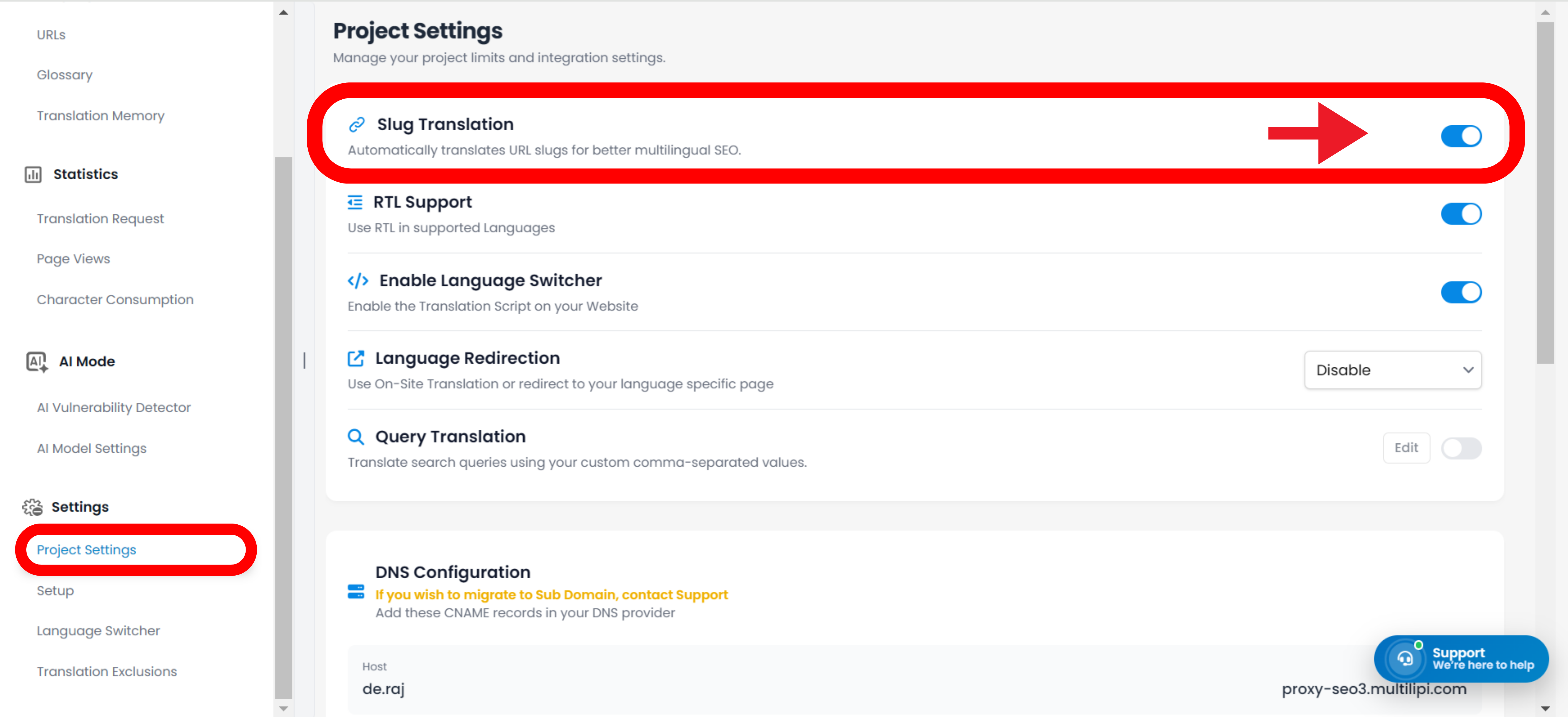
الخطوة 2: تفعيل الوحدة
- •مرر لأسفل إلى ترجمة الرابط المختصر القسم.
- •الإجراء: تأكد من تبديل المفتاح إلى
تشغيل(موضع أزرق).
سيقوم المحرك تلقائيًا بإنشاء عناوين URL محلية لجميع الصفحات الجديدة والحالية (على سبيل المثال، /contact → /contacto).
ستظل عناوين URL باللغة الإنجليزية، حتى في الصفحات المترجمة (على سبيل المثال، /es/contact).
2. تحديثات الطوبولوجيا الآلية (إعادة كتابة الروابط)
كيف يتعامل النظام مع التنقل الداخلي.
واحدة من أقوى ميزات محرك ترجمة عناوين URL هي إعادة كتابة الروابط تلقائيًا.
الآلية:
عند ترجمة رابط (على سبيل المثال، /shop → /boutique)، يقوم MultiLipi بفحص صفحاتك المحلية بحثًا عن الروابط الداخلية التي تشير إلى عنوان URL القديم.
الإجراء:
يقوم تلقائيًا بإعادة كتابة علامات <a href="..."> في HTML للإشارة إلى المسار المحلي الجديد.
النتيجة:
يبقى المستخدمون ضمن النظام البيئي المحلي. يتم توجيه المستخدم الفرنسي الذي ينقر على "Shop" إلى /boutique، وليس إلى /shop.
3. الإدارة: تجاوز يدوي
تحكم دقيق في كلمات مفتاحية عنوان URL.
بينما يقوم الذكاء الاصطناعي لدينا بإنشاء عناوين URL صديقة لمحركات البحث تلقائيًا، قد ترغب في تعديل عنوان URL يدويًا لاستهداف كلمات مفتاحية محلية محددة أو مطابقة حملة تسويقية.
- •انتقل إلى الترجمات قسم من لوحة التحكم الخاصة بك.
- •حدد صفحة معينة ترغب في تعديلها.
- •انقر تعديل الرابط بجانب معاينة عنوان URL.
- •الإدخال: اكتب السلسلة المفضلة لديك (على سبيل المثال، قم بتغيير
/productsإلى/boutique). - •التزام: انقر
حفظ التغييرات.
ملاحظة: سيقوم النظام على الفور بتحديث خريطة التوجيه الداخلية لتقديم المحتوى على هذا العنوان الجديد.
4. بروتوكول إدارة التصادم
منع تعارضات التوجيه.
في بعض اللغات، قد تترجم كلمتان إنجليزيتان مختلفتان إلى نفس الكلمة الأجنبية، مما يؤدي إلى إنشاء تصادم المسار.
السيناريو:
لديك /store (تجزئة) و /shop (فعل). قد تتم ترجمة كليهما تلقائيًا إلى /boutique بالفرنسية.
الخطر:
عناوين URL المكررة تربك محركات البحث وتسبب أخطاء في التوجيه.
الحل:
استخدم تجاوز يدوي (الخطوة 3) للتمييز بينها (على سبيل المثال، احتفظ بـ /boutique للمتجر واستخدام /acheter للفعل).
5. استراتيجية إعادة توجيه الإرث (301s)
التعامل مع التغييرات على عناوين URL الحية.
إذا قررت تغيير عنوان URL مترجم بعد أن قام Google بفهرسته بالفعل (على سبيل المثال، تغيير /fr/a-propos إلى /fr/notre-histoire)، يجب عليك التأكد من أن المستخدمين لا يواجهون خطأ 404.
أفضل ممارسة:
إعداد إعادة توجيه 301 في نظام إدارة المحتوى الأساسي الخاص بك (WordPress/Shopify/Webflow).
سير العمل:
إعادة توجيه نمط عنوان URL المترجم القديم إلى نمط عنوان URL المترجم الجديد للحفاظ على تحسين محركات البحث الخاص بك "عصير الروابط".
6. تكامل عالمي لنظام إدارة المحتوى
توجيه مستقل عن المنصة.
لأن MultiLipi يعمل كـ طبقة الوكيل، تعمل ترجمة عناوين URL بشكل مستقل عن الواجهة الخلفية الخاصة بك.
المنصات المدعومة:
WordPress، Shopify، Webflow، Wix، Squarespace، و HTML مخصص.
لا حاجة لإعدادات الواجهة الخلفية:
لا تحتاج إلى إنشاء هذه الصفحات في نظام إدارة المحتوى الخاص بك. MultiLipi يعين افتراضيًا الطلب /fr/boutique إلى الأصلي الخاص بك /shop الصفحة مع تقديم المحتوى المترجم.