

1. ميزة الموقع (لماذا الأدلة الفرعية؟)
التحسين لعصر الذكاء الاصطناعي.
التحسين التقليدي لمحركات البحث مع التركيز على الكلمات المفتاحية. تحسين المحرك التوليدي (GEO) يمثل تحولاً جذرياً - يركز على "سلطة الكيان" والفهم الدلالي. تقوم نماذج الذكاء الاصطناعي مثل ChatGPT و Gemini و Perplexity بتقييم ما إذا كانت علامتك التجارية كياناً متماسكاً وموثوقاً. تعمل الدلائل الفرعية على توحيد جميع المحتويات متعددة اللغات تحت نطاق واحد، مما يزيد بشكل كبير من احتمالية الاستشهاد في الإجابات التي يولدها الذكاء الاصطناعي.
سلطة الاستشهاد
الاستخدام site.com/fr/ بدلاً من fr.site.com تُرسل هذه الإشارة لنماذج الذكاء الاصطناعي بأن المحتوى الخاص بك جزء لا يتجزأ من كيان علامتك التجارية الرئيسية. هذه البنية الموحدة تزيد بشكل كبير من احتمالية الاستشهاد عبر جميع الأسواق اللغوية.
توحيد الرسم البياني المعرفي
كل الزيارات، والروابط الخلفية، وإشارات التفاعل تصب في درجة سلطة نطاق واحدة. كل رابط خلفي إلى site.com/es/ يقوي نطاقك بالكامل - بما في ذلك site.com/fr/ و site.com - مما يخلق ملف تعريف سلطة موحدًا تتعرف عليه نماذج الذكاء الاصطناعي على أنه موثوق.
2. متطلبات النشر المسبق
متطلبات توجيه الدليل الفرعي الافتراضي.
لتمكين التوجيه الافتراضي عبر الدليل الفرعي دون إنشاء مجلدات فعلية على الخادم الخاص بك، يجب أن تفي بيئتك بهذه القيود:
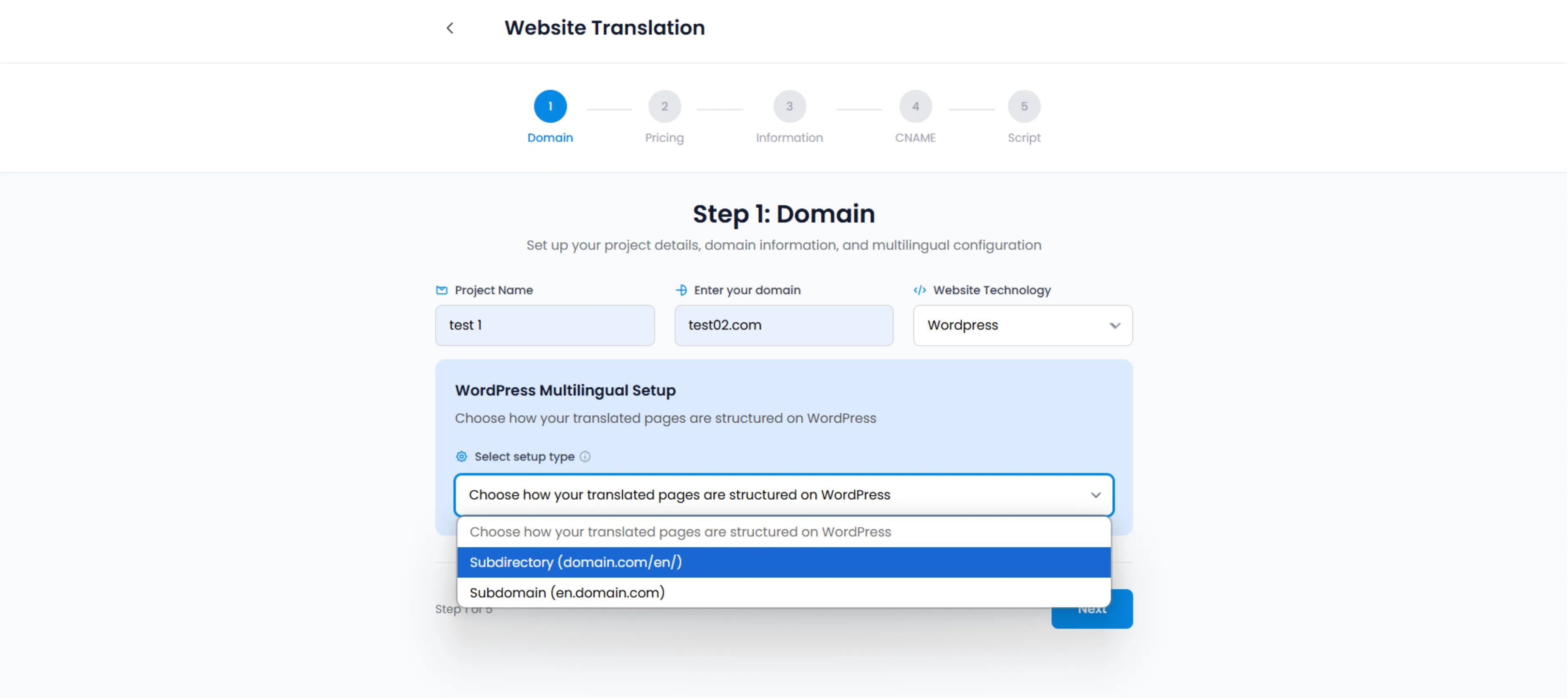
سيلكت الدليل الفرعي (domain.com/en/) أثناء إعداد المشروع لتمكين سلطة تحسين محركات البحث الموحدة
إعدادات الروابط الدائمة
يجب تعيين روابط WordPress الدائمة الخاصة بك على أي شيء بخلاف "بسيط". (يوصى به، على سبيل المثال، "اسم المقالة").
المسار: الإعدادات ← الروابط الدائمة
إعادة كتابة الخادم
يجب أن يدعم خادمك إعادة كتابة عنوان URL.
Apache:
يتطلب .htaccess الدعم (قياسي في 99٪ من مضيفي WP).
Nginx / LiteSpeed:
يعمل عادةً بشكل مباشر.
ملحق MultiLipi
يعمل المكون الإضافي الرسمي كـ وحدة تحكم حركة المرور، اعتراض الطلبات الواردة إلى /fr/ وتقديم الحمولة المترجمة ديناميكيًا.
3. كيفية عمل محرك التوجيه
لا توجد مجلدات فعلية مطلوبة.
عندما يطلب المستخدم yoursite.com/fr/about، MultiLipi يفعل ليس ابحث عن مجلد باسم fr على خادمك.
1. الاعتراض
يعترض المكون الإضافي MultiLipi طلب 404 الذي سيحدث عادةً.
2. الحقن
يقوم بالاستعلام عن واجهة برمجة التطبيقات الخاصة بنا للإصدار الفرنسي من صفحة "حول".
3. التسليم
يقوم بتشغيل HTML المترجم ديناميكيًا مع الحفاظ على بنية عنوان URL سليمة.
4. مزامنة البيانات الوصفية
يقوم تلقائيًا بحقن علامات hreflang الصحيحة، مما يحدد الصفحة كبديل محلي.
4. بروتوكول استكشاف الأخطاء وإصلاحها (أخطاء 404)
إصلاح مشاكل الروابط الدائمة الشائعة.
إذا قمت بتمكين الأدلة الفرعية وعادت صفحاتك المترجمة خطأ 404 غير موجود، فإنه يكاد يكون دائمًا "تحديث الروابط الدائمة" السبب.
بروتوكول الإصلاح:
1. الوصول إلى المسؤول
انتقل إلى لوحة تحكم ووردبريس الخاصة بك.
2. التنقل
انتقل إلى الإعدادات ← الروابط الدائمة.
3. مسح القواعد
انقر فوق "حفظ التغييرات" لإعادة إنشاء قواعد إعادة الكتابة.
4. مسح ذاكرة التخزين المؤقت
مسح جميع ذاكرات التخزين المؤقت إذا كنت تستخدم WP Rocket أو W3 Total Cache.
مؤشر النجاح:
بعد إكمال هذه الخطوات، ستكون عناوين URL الفرعية (على سبيل المثال، /fr/about/" يجب أن يتم تحميلها بشكل صحيح بدون أخطاء 404.