

بالنسبة لبيئات ووردبريس، يعد الحفاظ على التحكم في هياكل عناوين URL أمرًا بالغ الأهمية لتحسين محركات البحث المحلي. تتضمن إضافة ووردبريس MultiLipi مخصصًا مدير أجزاء عناوين URL مما يسمح لك بتحديد قواعد تعيين صريحة بين مسارات المصدر الخاصة بك (على سبيل المثال، /about-us/) وأهدافها المحلية (على سبيل المثال، /अनुवादित-पृष्ठ/). هذا يضمن الحفاظ على الكلمات الرئيسية المحددة الخاصة بك في بنية عنوان URL قبل مغادرة الطلب لخادمك.
يوضح هذا الدليل البروتوكول الخاص بتعريف خرائط التوجيه هذه.
1. بنية التعيين
كيف تتعامل الإضافة مع التوجيه.
تعمل الإضافة كـ المعترض. عندما يصل طلب إلى موقع WordPress الخاص بك مسار مترجم محدد في هذا المدير، يحدد الملحق التعيين ويقدم المحتوى الأساسي الصحيح دون إنشاء خطأ 404. يتيح لك هذا "إخفاء" عناوين URL باللغة الإنجليزية باستخدام أجزاء عناوين (Slugs) باللغة الأصلية بسلاسة.
2. بروتوكول التكوين
إدارة هذه القواعد مباشرة من لوحة تحكم WordPress الخاصة بك.
الخطوة 1: الوصول إلى سياق مسؤول ووردبريس
قم بتسجيل الدخول إلى لوحة تحكم ووردبريس الخاصة بك (/wp-admin).
تأكد من تثبيت وتفعيل إضافة MultiLipi.
الخطوة 2: تهيئة مدير الشرائح
في شريط WordPress الجانبي الرئيسي، حدد موقع وانقر فوق MultiLipi.
من القائمة الفرعية، حدد عناوين URL.
السياق: يفتح هذا شاشة MultiLipi مدير عناوين URL، ويعرض جميع الخرائط المحلية النشطة.
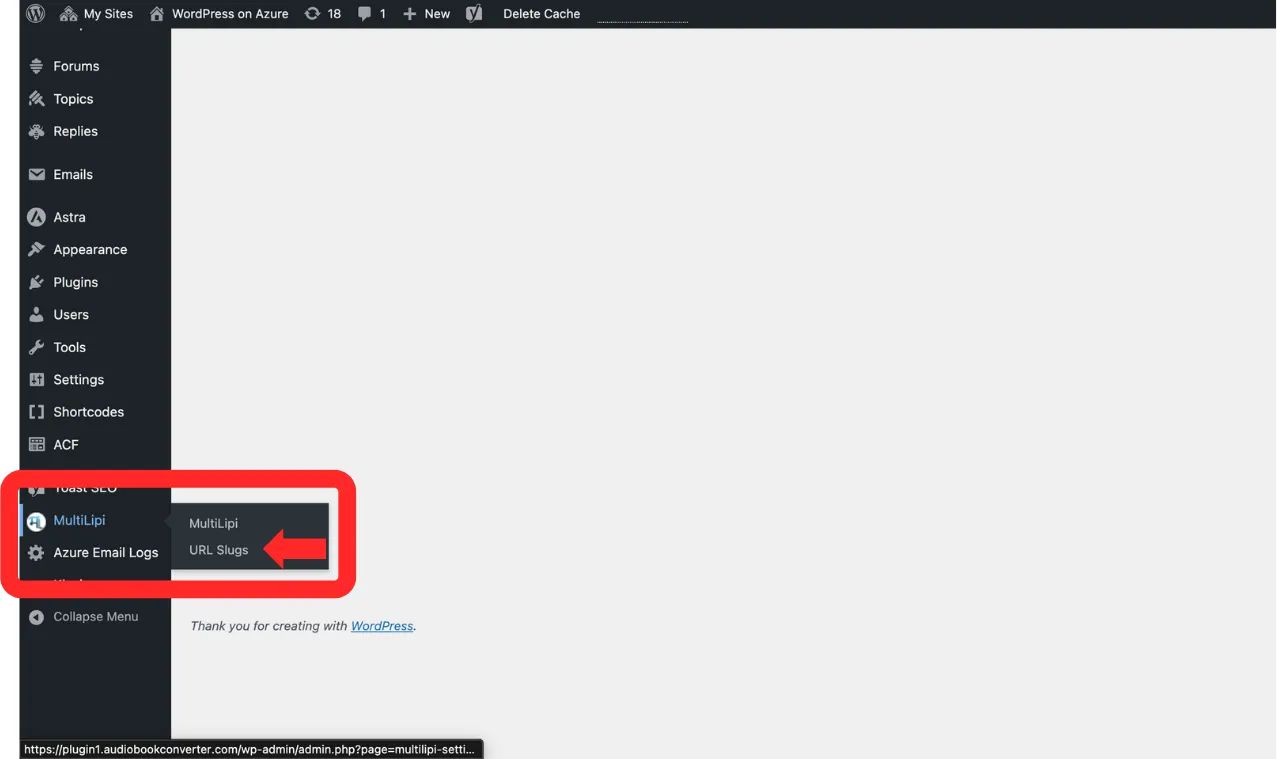
انتقل إلى MultiLipi → عناوين URL من الشريط الجانبي لووردبريس
الخطوة 3: تحديد قاعدة جديدة
انقر فوق "+ إضافة عناوين URL جديدة" زر.
سيظهر صف إدخال جديد. املأ المخطط كما يلي:
اللغة: حدد رمز اللغة المستهدفة (على سبيل المثال، hi — الهندية).
المسار الأصلي: أدخل عنوان URL المصدر الحالي (على سبيل المثال، /sample-page/). ملاحظة: يجب أن تكون هذه الصفحة موجودة بالفعل.
المسار المترجم: أدخل المسار المخصص المطلوب (على سبيل المثال، /अनुवादित-पृष्ठ/).
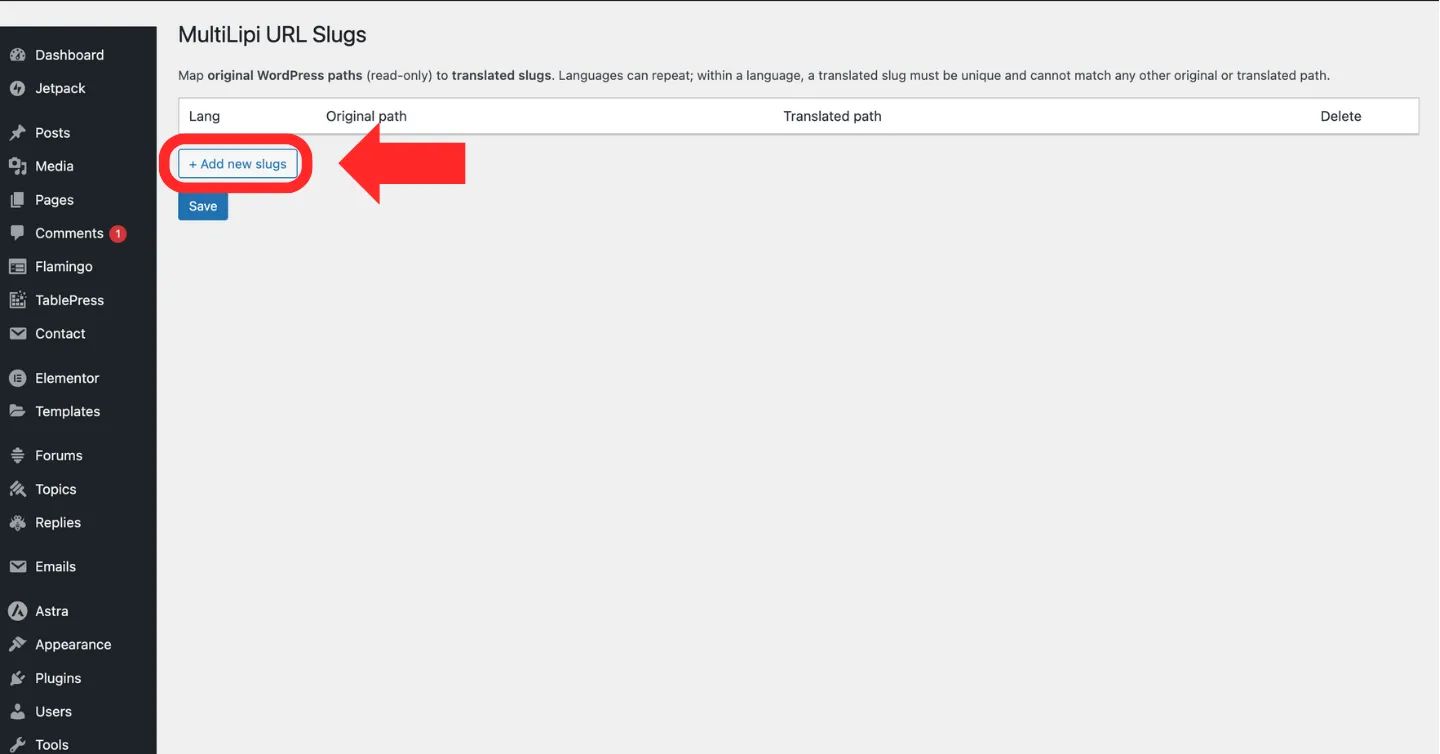
انقر فوق "+ إضافة عناوين URL جديدة" زر لإنشاء قاعدة تعيين عنوان URL جديدة
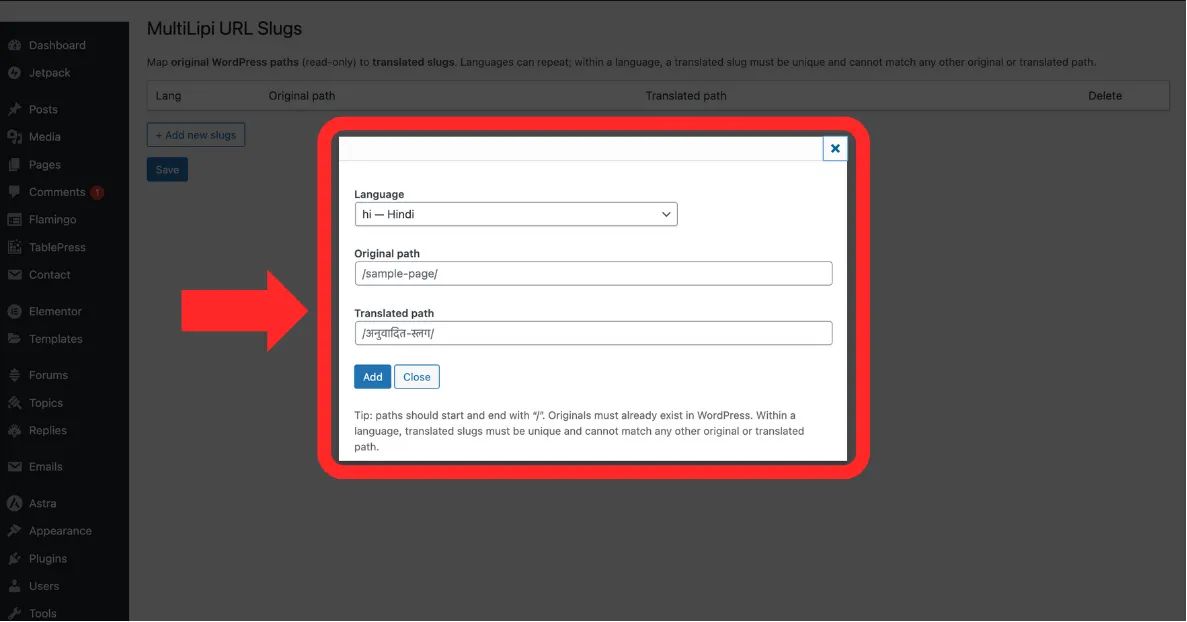
املأ اللغة, المسار الأصلي، و المسار المترجم حقول
الخطوة 4: تأكيد التعيين
انقر حفظ لتطبيق القاعدة.
إجراء النظام: يتم تحديث خريطة التوجيه على الفور. سيتمكن المستخدمون الذين يتصفحون باللغة الهندية والذين يزورون المسار المترجم من رؤية المحتوى الصحيح الآن.
3. التحقق والقيود
قواعد الهندسة للمسارات الصالحة.
لمنع أخطاء التوجيه أو الحلقات اللانهائية، يفرض النظام القيود الصارمة التالية:
اتساق الشرطة المائلة
يجب أن يبدأ كل مسار (الأصلي والمترجم) وينتهي بشرطة مائلة للأمام /.
صحيح: /about-us/
غير صحيح: عن-شركتنا
التفرّد
الـ المسار المترجم يجب أن تكون فريدة ضمن لغة معينة. لا يمكنك تعيين صفحتين مختلفتين لنفس المسار.
التحقق من الوجود
لا يمكنك تعيين "عنوان URL شبحي". ال المسار الأصلي يجب أن تشير إلى صفحة صالحة ومنشورة على موقع ووردبريس الخاص بك.