
بينما تتولى MultiLipi's AI التعامل مع الجزء الأكبر، فإن الحفاظ على صوت علامة تجارية متسق يتطلب لمسة بشرية. سواء كنت بحاجة إلى إصلاح مصطلح تقني أو تعديل النبرة لسوق معين، توفر MultiLipi واجهتين قويتين لإدارة المحتوى الخاص بك: المحرر اليدوي (للتحديثات المجمعة) و المحرر المرئي (للسياق على الصفحة).
تسمح لك كلتا الطريقتين بتحرير وتنقيح ونشر التغييرات فورًا على موقعك المباشر.
لماذا التحرير اليدوي مهم
يساعد تنقيح ترجمات الذكاء الاصطناعي في الحفاظ على اتساق العلامة التجارية، وإصلاح المصطلحات التقنية، وتحسين الكلمات المفتاحية لمحركات البحث المحلية، وضمان الملاءمة الثقافية عبر الأسواق.
الطريقة الأولى: المحرر اليدوي (الإدارة المجمعة)
الأفضل لـ: مراجعة قوائم النصوص بسرعة، وإصلاح المصطلحات، وتحسين الكلمات المفتاحية لمحركات البحث.
يوفر محرر الدليل اليدوي عرضًا مبسطًا جنبًا إلى جنب للنص المصدر والمترجم، مما يسهل تدقيق المحتوى بكفاءة.
الخطوة 1: الوصول إلى لوحة تحكم المشروع
قم بتسجيل الدخول إلى لوحة تحكم MultiLipi الخاصة بك وانقر المشاريع في الشريط الجانبي. حدد النطاق المحدد الذي ترغب في إدارته.
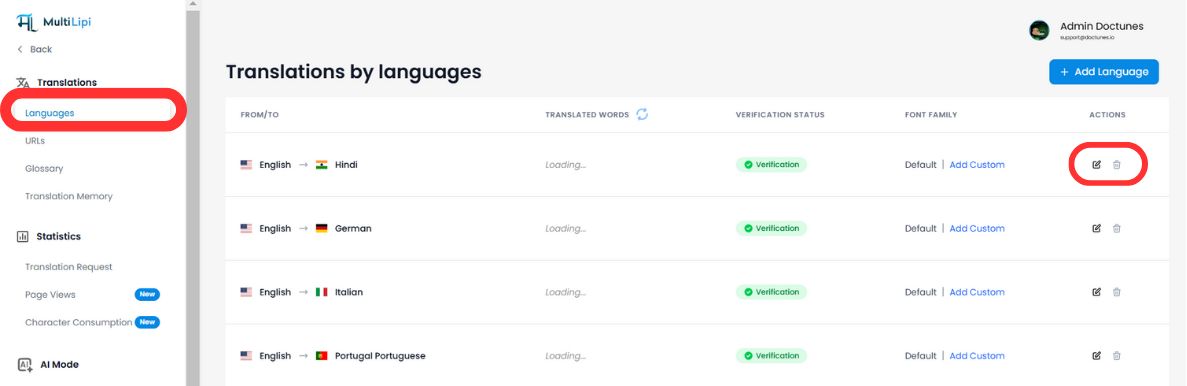
الخطوة 2: تحديد لغة الهدف
اختر اللغة التي تريد تحريرها (على سبيل المثال، "الفرنسية"). سيقوم النظام بتحميل قائمة كاملة بجميع سلاسل النصوص الموجودة على موقعك إلى جانب ترجماتها الحالية.
الخطوة 3: تحرير المحتوى
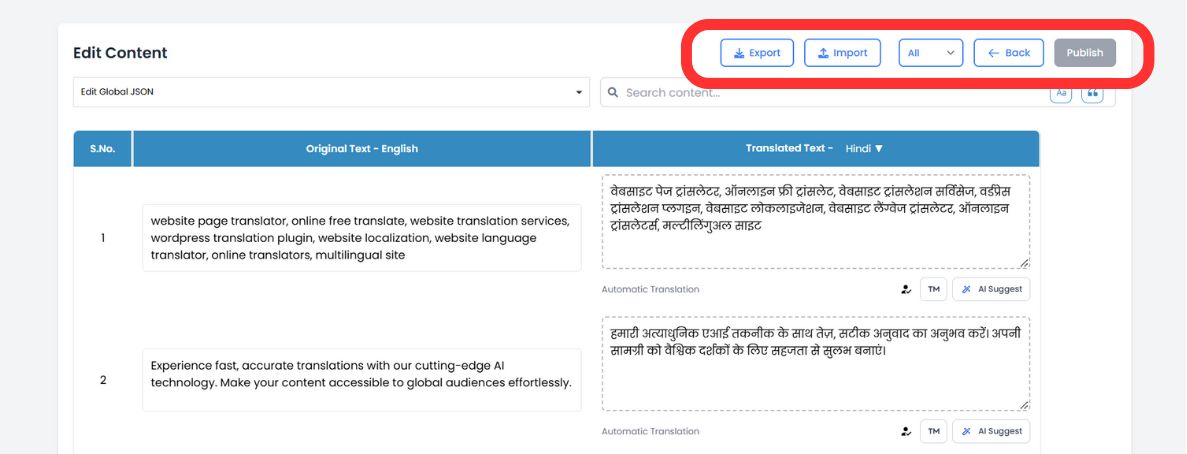
انقر داخل أي مربع ترجمة لتعديل النص. يمكنك استخدام شريط البحث العلوي للعثور فورًا على عبارات محددة أو أسماء منتجات أو عناوين رئيسية تحتاج إلى اهتمام.
الخطوة 4: الاستفادة من اقتراحات الذكاء الاصطناعي (جديد)
أثناء التحرير، يقوم محرك الذكاء الاصطناعي لدينا الآن بتحليل النص الخاص بك في الوقت الفعلي. انظر أسفل كل حقل للحصول على اقتراحات ذكية مصممة خصيصًا لتحسين قابلية القراءة وأداء تحسين محركات البحث (SEO).
استبدال بنقرة واحدة
إذا اقترح الذكاء الاصطناعي صياغة أفضل (أو طابق مصطلحًا من مسردك)، فما عليك سوى النقر على الاقتراح لتبديله فورًا في حقل المحرر.
الخطوة 5: النشر
بمجرد رضاك، انقر على زر نشر في الزاوية العلوية اليمنى. يتم دفع تحديثاتك إلى الشبكة العالمية على الفور.
الطريقة 2: المحرر المرئي (مراجعة ضمن السياق)
الأفضل لـ: تعديلات واجهة المستخدم/تجربة المستخدم، ونصوص التسويق، وإصلاحات تخطيط التصميم.
السياق هو كل شيء. يتيح لك المحرر المرئي تصفح موقعك الفعلي وتحرير الترجمات مباشرة على الشاشة، مما يضمن ملاءمة النص تمامًا لتصميمك.
الخطوة 1: تشغيل الواجهة
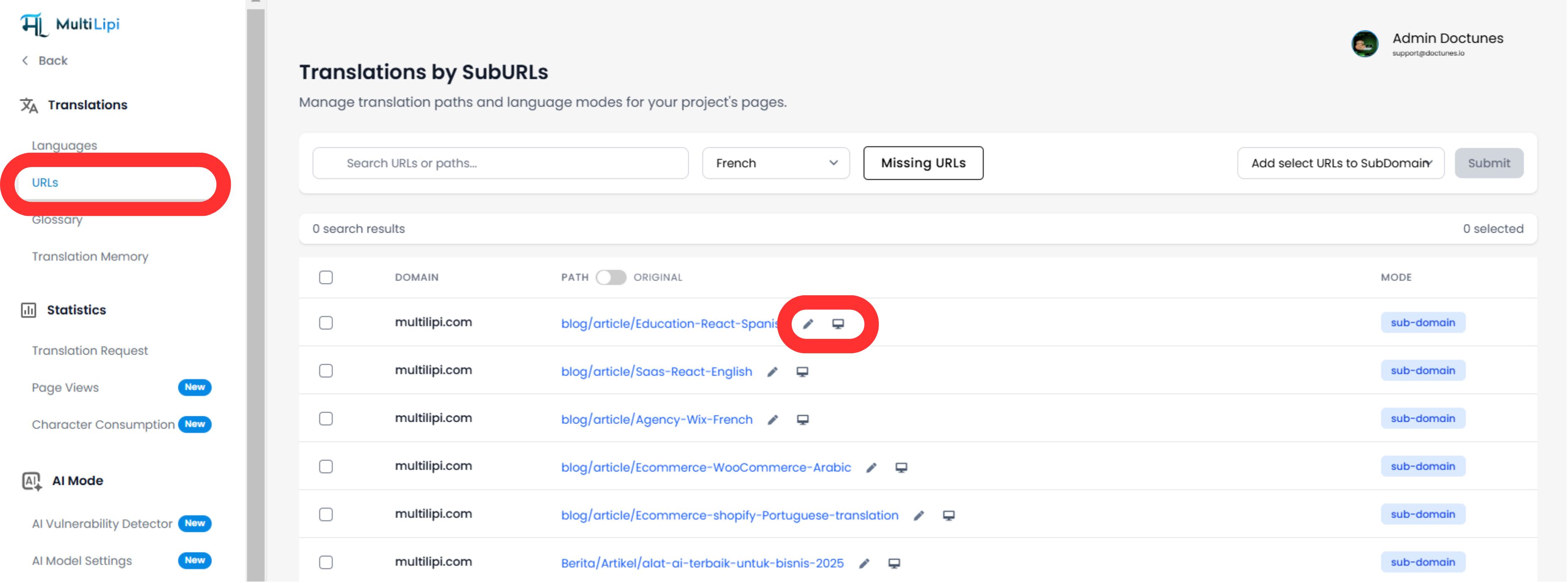
انتقل إلى الترجمات > عناوين URL في الشريط الجانبي للوحة التحكم. سترى قائمة بجميع الصفحات المفهرسة.
الخطوة 2: فتح العرض المباشر
انقر فوق أيقونة المحرر المرئي (🖥️) بجانب الصفحة التي تريد تحريرها. يفتح هذا معاينة تفاعلية مباشرة لموقعك باللغة المحددة.
الخطوة 3: النقر للتحرير
ما عليك سوى النقر على أي عنصر نصي - عناوين، أزرار، أو فقرات - لفتح المحرر المضمن.
فحص التخطيط في الوقت الفعلي
شاهد على الفور ما إذا كان الترجمة طويلة جدًا وتفسد تصميمك.
تحسين محركات البحث للصور
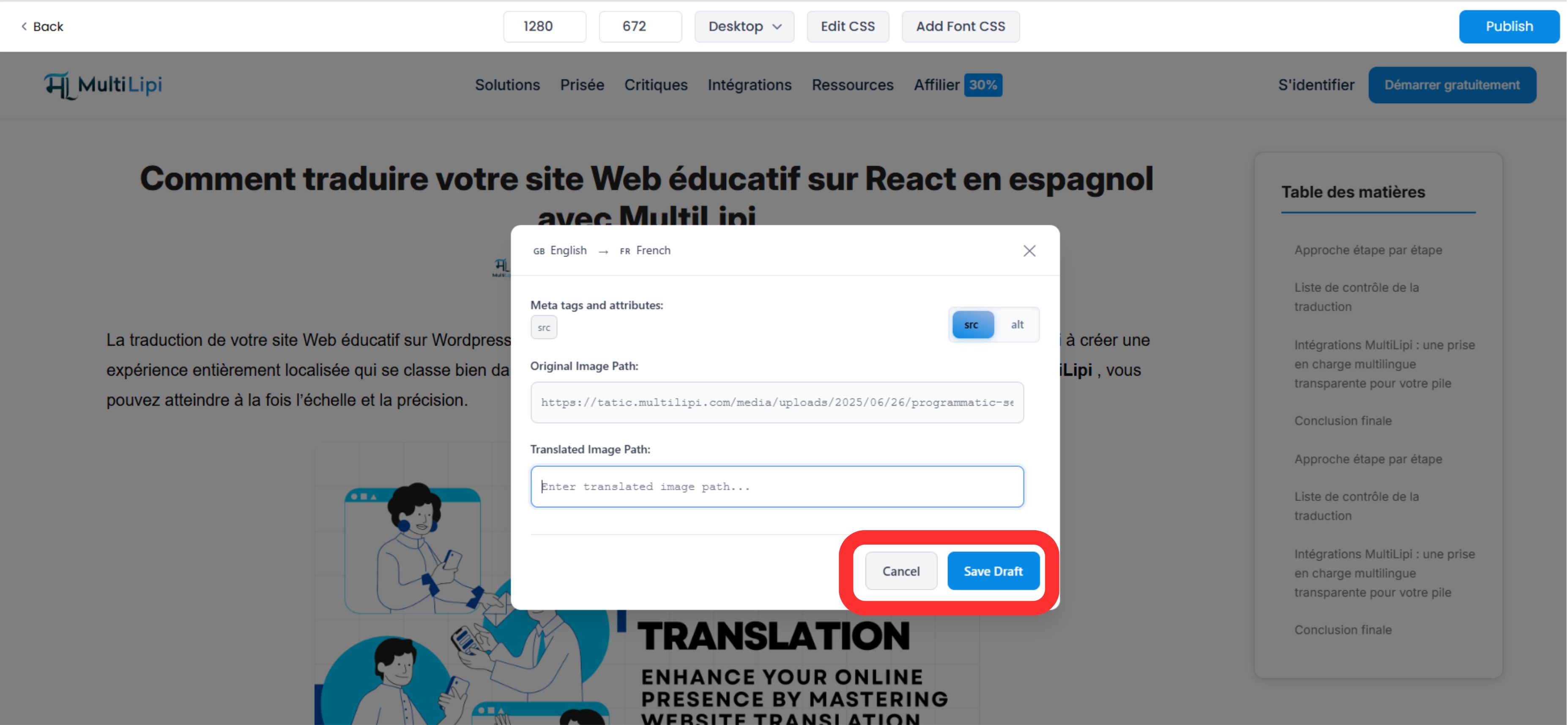
انقر على الصور لترجمة علامات النص البديل (Alt Tags) مباشرة، مما يعزز ظهورك في صور Google لتلك المنطقة.
الخطوة 4: تطبيق تحسينات الذكاء الاصطناعي
يتضمن المحرر المرئي الآن أدوات سياق متقدمة:
- •منزلقات النبرة: اضبط الرسمية (على سبيل المثال، احترافي مقابل ودود) ودع الذكاء الاصطناعي يعيد كتابة النص ليتناسب معه.
- •كشف عدم المحاذاة: يقوم النظام تلقائيًا بتمييز النصوص التي قد تبدو معطلة أو غير متوافقة.
الخطوة 5: النشر
انقر نشر لنشر تغييراتك مباشرة. يمكنك التبديل بين اللغات عبر القائمة المنسدلة العلوية لتكرار العملية لمناطق أخرى دون مغادرة الصفحة.
لماذا هذا مهم للنمو
التحرير ليس مجرد تصحيح أخطاء؛ بل هو استراتيجية تحويل.
إشارات الثقة
قد يؤدي خطأ نحوي في زر الدفع إلى إلغاء عملية بيع. يضمن المراجعة اليدوية السريعة أن تبدو "صفحات الأموال" الخاصة بك (التسعير، الدفع) أصلية وجديرة بالثقة.
سلطة تحسين محركات البحث
يمكن أن يؤدي استخدام المحرر اليدوي لإدراج الكلمات المفتاحية المحلية ذات الحجم الكبير (على سبيل المثال، تغيير "Cell Phone" إلى "Handy" لألمانيا) إلى تحسين ترتيبك في البحث المحلي بشكل كبير.
💡 نصيحة احترافية: اجمع بين كلا المحررين في سير عملك. استخدم المحرر اليدوي لإجراء تعديلات المصطلحات بالجملة وتحسين محركات البحث، ثم انتقل إلى المحرر المرئي للتحقق من أن التغييرات تبدو مثالية ضمن تخطيط التصميم الفعلي الخاص بك.