

قم بتوسيع نطاق تطويرك المرئي عالمياً دون الحاجة إلى رموز خلفية.
يعد Webflow المنصة الرائدة للتطوير المرئي، ولكن التوطين الأصلي قد يكون معقداً ومكلفاً. يندمج MultiLipi مباشرة في بنية Webflow عبر حقن برنامج نصي واحد، مما يحول صفحاتك الثابتة ومجموعات نظام إدارة المحتوى (CMS) فوراً إلى بنية تحتية متعددة اللغات مع فهرسة كاملة لمحركات البحث (SEO).
يشرح هذا الدليل بالتفصيل عملية التكامل باستخدام كود مخصص الميزة.
1. متطلبات النشر المسبقة
قبل البدء، تأكد من استيفاء بيئتك للمتطلبات:
خطة موقع Webflow
يجب أن تكون على خطة الموقع الأساسية (أو أعلى) لفتح ميزة "الرموز المخصصة" (Custom Code).
مفتاح واجهة برمجة تطبيقات MultiLipi
حدد موقع هذا في لوحة التحكم الخاصة بك تحت الإعدادات > عام.
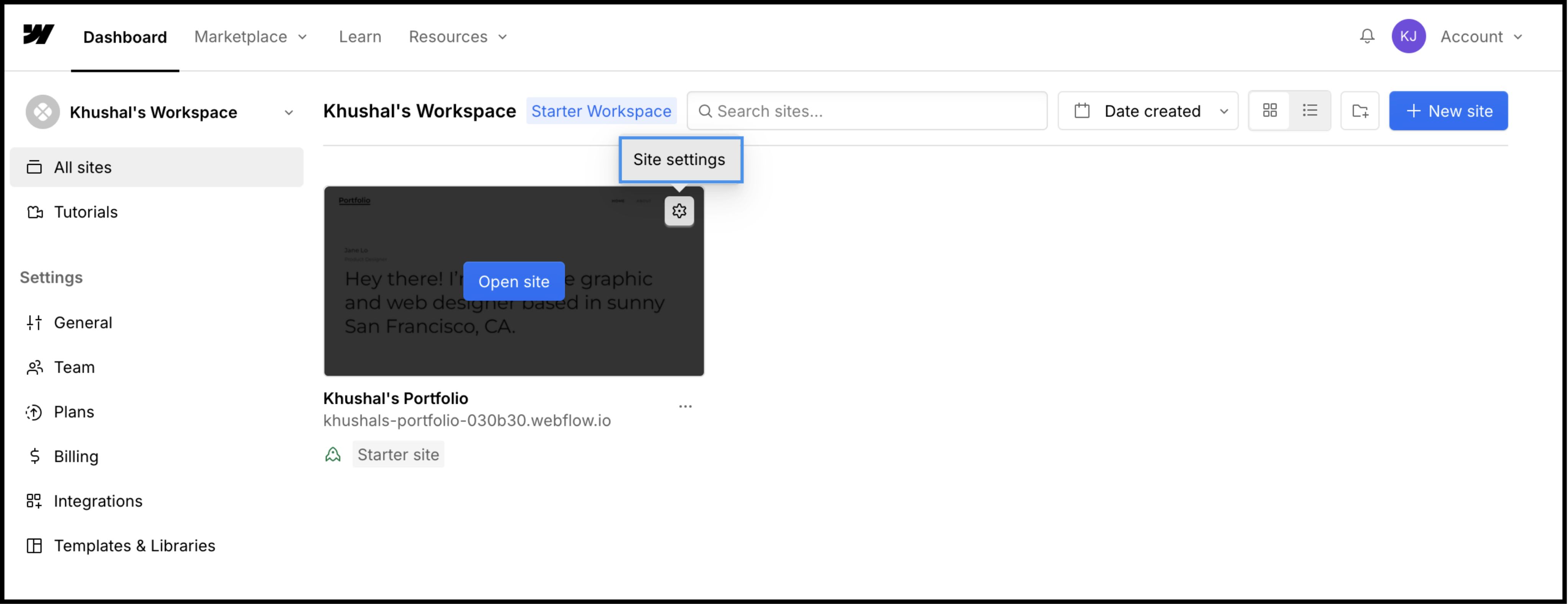
2. الخطوة 1: الوصول إلى بنية الموقع
سنقوم بإدراج محرك الترجمة في الترويسة العامة لضمان استمراره عبر جميع الصفحات وقوالب نظام إدارة المحتوى (CMS).
- 1
تسجيل الدخول إلى لوحة تحكم Webflow.
- 2
حدد موقع بطاقة مشروعك وانقر على أيقونة الإعدادات (⚙️) (أو حدد إعدادات الموقع من قائمة المصمم).
- 3
انتقل إلى كود مخصص علامة التبويب في شريط التنقل العلوي.
3. الخطوة 2: حقن سكربت البنية التحتية
- 1
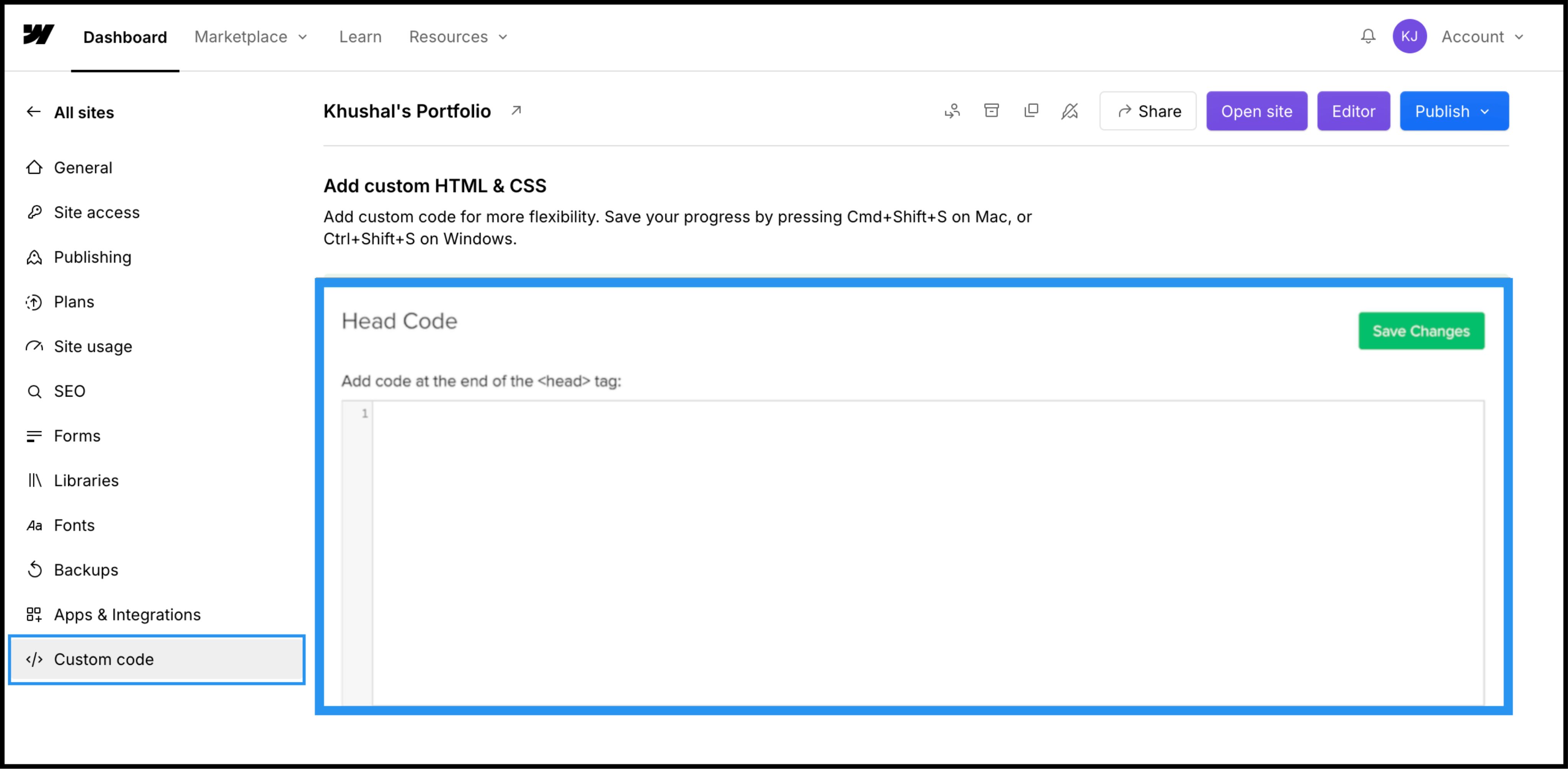
قم بالتمرير لأسفل إلى الحقل المسمى "كود الرأس (Head Code)".
- 2
ملاحظة: لا تضع هذا في "كود التذييل (Footer Code)"، حيث سيؤدي ذلك إلى تأخير تحميل الترجمة التنبؤية والتسبب في ظهور "وميض المحتوى غير المترجم".
الإجراء: الصق نص الاتصال البرمجي
الصق نص برمجي الاتصال التالي في الحقل:
<script
  src="https://multilipistorage.blob.core.windows.net/static/js/page_translations.js"
  key="YOUR_API_KEY_HERE"
></script>
⚠️ الإعدادات الهامة
- •استبدال
YOUR_API_KEY_HEREباستخدام مفتاح API الفعلي الذي تم نسخه من لوحة تحكم MultiLipi الخاصة بك. - •انقر على اللون الأخضر حفظ التغييرات الزر في الزاوية العلوية اليمنى.
4. الخطوة 3: النشر والتحقق
لا يقوم Webflow بتشغيل الكود المخصص في عرض المصمم. يجب عليك النشر لرؤية المحرك قيد التشغيل.
نشر
انقر على الزر الأزرق نشر الزر وحدد نطاق الإنتاج الخاص بك (أو .webflow.io نطاق المراحل (Staging).
تحقق
افتح الرابط المباشر.
فحص مرئي
يجب أن يظهر محول اللغة في الزاوية السفلية اليسرى.
التحقق من نظام إدارة المحتوى (CMS)
انتقل إلى صفحة مجموعة CMS (على سبيل المثال، /blog/post-1) وقم بتغيير اللغات لضمان ترجمة المحتوى الديناميكي بشكل صحيح.
بروتوكول استكشاف الأخطاء وإصلاحها
- •محول اللغات غير موجود؟ تأكد من نشر الموقع بعد حفظ الكود.
- •فحص الخطة: تأكد من أن خطة استضافة Webflow الخاصة بك نشطة؛ غالباً ما تقيّد مواقع التجربة المجانية تنفيذ الكود المخصص على النطاقات المخصصة.
5. التحسين والتنسيق
بمجرد النشر، تعمل MultiLipi في الخلفية بصمت.
سلامة التصميم
نظراً لأننا نقوم بتبديل عقد النص فقط، فإن تفاعلات Webflow الخاصة بك (IX2) وتأثيرات التمرير تظل سليمة تماماً.
تخصيص محول اللغات
يمكنك إعادة وضع محول اللغات باستخدام إعدادات لوحة التحكم الخاصة بنا أو تجاوز CSS الخاص به ليطابق الطباعة الخاصة بموقعك.
أتمتة تحسين محركات البحث
نقوم تلقائياً بتوليد sitemap.xml الإدخالات و hreflang العلامات لمشروع Webflow الخاص بك، مما يضمن ظهورك في نتائج البحث العالمية دون الحاجة لعمل تحسين محركات بحث يدوي.