

Integrate enterprise localization without database bloat.
Traditional WordPress translation plugins often slow down sites by duplicating every post and page in your database. MultiLipi takes a different approach. Our dedicated WordPress plugin acts as a lightweight API Connector, linking your site to our Neural Translation Cloud. This ensures your site remains fast while delivering SEO-optimized content in 120+ languages.
This guide details the installation and authentication process using the official ترجمة MultiLipi plugin.
1. متطلبات النشر المسبقة
Before beginning the installation, ensure you have:
Admin Access
You must have permissions to install and activate plugins (administrator role).
مفتاح واجهة برمجة تطبيقات MultiLipi
حدد موقع هذا في لوحة التحكم الخاصة بك تحت الإعدادات > عام.
2. Step 1: Install the Connector Module
The plugin is hosted in the official WordPress repository for security and ease of updates.
- 1
تسجيل الدخول إلى WordPress Admin Dashboard.
- 2
انتقل إلى الإضافات > إضافة جديد في الشريط الجانبي الأيسر.
- 3
Search: Type "MultiLipi Translate" in the search bar.
- 4
Install: انقر Install Now on the official MultiLipi plugin.
- 5
Activate: انقر Activate to initialize the module.
إجراء النظام
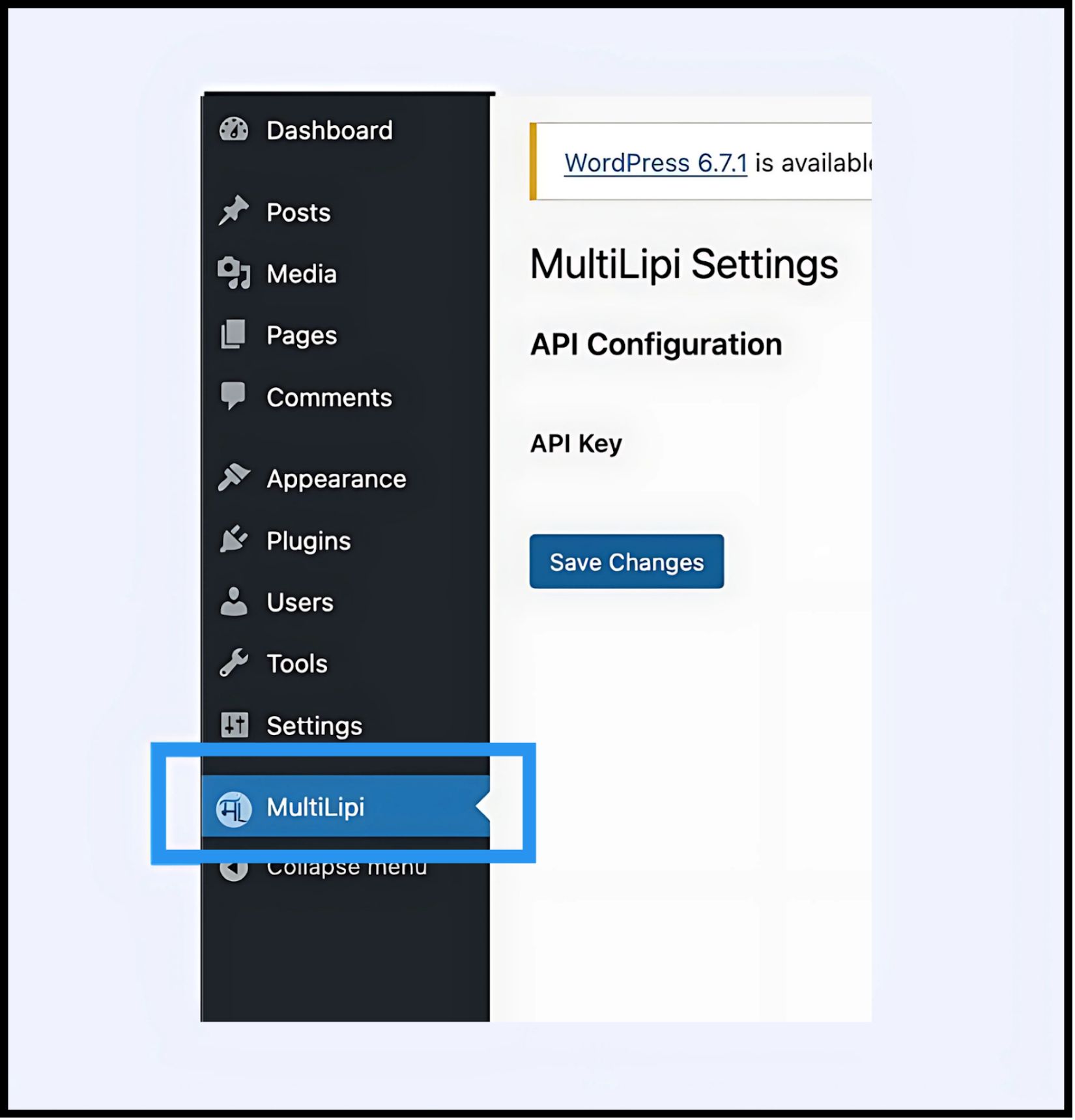
A new menu item labeled MultiLipi will appear under your main الإعدادات علامة التبويب.
3. Step 2: Establish the API Handshake
You must authenticate the plugin to connect your site to your MultiLipi project.
- 1
انتقل إلى الإعدادات > MultiLipi.
- 2
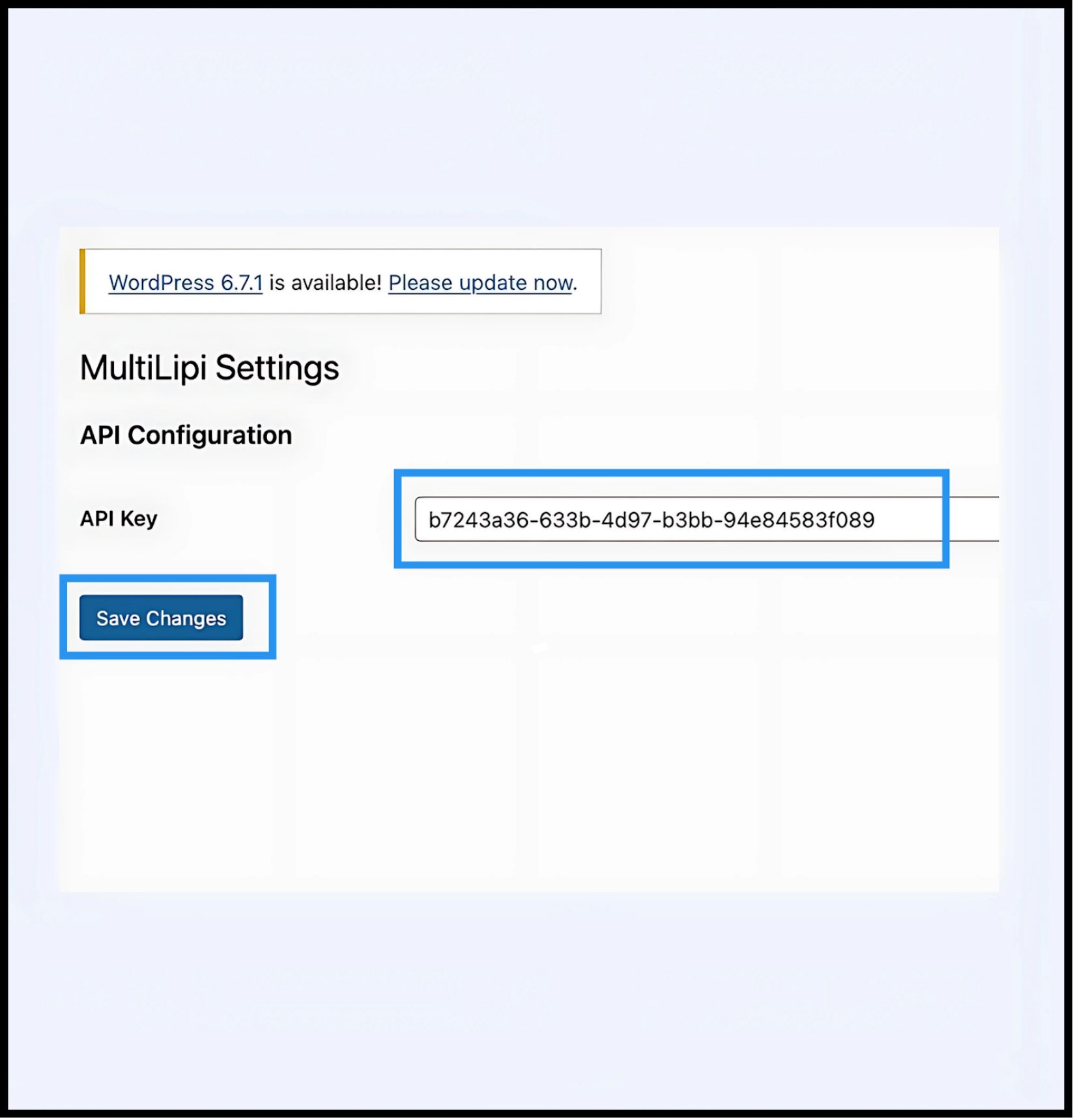
API Configuration: تحديد موقع مفتاح واجهة برمجة التطبيقات field.
- 3
Authentication: Paste your unique Project API Key (copied from your MultiLipi Dashboard).
- 4
التزام: انقر حفظ التغييرات.
النتيجة
The plugin validates the key and establishes a secure connection to the translation engine.
4. Step 3: Edge Verification
Once authenticated, the translation layer is active immediately.
Reload
Visit your public-facing website.
فحص مرئي
The Language Switcher should appear in the bottom-left corner (default position).
Functional Test
Switch languages and verify that content translates instantly.
بروتوكول استكشاف الأخطاء وإصلاحها
- •Cache Purge: If you use caching plugins (WP Rocket, W3 Total Cache) or server-side caching (Varnish, Nginx), you must clear your cache after installation for the switcher to appear.
- •Conflict Check: Ensure no other translation plugins (like WPML or Polylang) are active on the same pages, as they may conflict with the DOM injection.
5. Post-Deployment Management
With the plugin active, your WordPress site is now synchronized with our infrastructure.
Glossary & SEO
You do not need to manage translations inside WordPress. Log in to your MultiLipi Dashboard to define قواعد المسرد, configure علامات Hreflang, and manage عناوين URL المترجمة.
Visual Overrides
استخدم المحرر المرئي in the MultiLipi dashboard to fix any layout issues caused by text expansion (e.g., in German or Russian).
Updates
All translation edits made in the MultiLipi cloud reflect instantly on your WordPress site without needing to update the plugin or clear caches again.