

قم بدمج التوطين المؤسسي دون تضخم قاعدة البيانات.
غالبًا ما تؤدي إضافات ترجمة ووردبريس التقليدية إلى إبطاء المواقع عن طريق تكرار كل منشور وصفحة في قاعدة بياناتك. MultiLipi تتبع نهجًا مختلفًا. تعمل إضافة ووردبريس المخصصة لدينا كـ موصل واجهة برمجة التطبيقات، لربط موقعك بـ سحابة الترجمة العصبيةالخاصة بنا. يضمن هذا بقاء موقعك سريعًا مع تقديم محتوى مُحسّن لمحركات البحث بأكثر من 120 لغة.
يفصل هذا الدليل عملية التثبيت والمصادقة باستخدام ترجمة MultiLipi الإضافة
1. متطلبات النشر المسبقة
الرسمية. قبل البدء في التثبيت، تأكد من أن لديك:
وصول المسؤول
يجب أن يكون لديك أذونات لتثبيت وتفعيل الإضافات (دور المسؤول).
مفتاح واجهة برمجة تطبيقات MultiLipi
حدد موقع هذا في لوحة التحكم الخاصة بك تحت الإعدادات > عام.
2. الخطوة 1: تثبيت وحدة الموصل
تتم استضافة الإضافة في مستودع ووردبريس الرسمي للأمان وسهولة التحديثات.
- 1
تسجيل الدخول إلى لوحة تحكم ووردبريس الإدارية.
- 2
انتقل إلى الإضافات > إضافة جديد في الشريط الجانبي الأيسر.
- 3
بحث: اكتب "MultiLipi Translate" في شريط البحث.
- 4
تثبيت: انقر التثبيت الآن على إضافة MultiLipi الرسمية.
- 5
تفعيل: انقر تفعيل لتهيئة الوحدة.
إجراء النظام
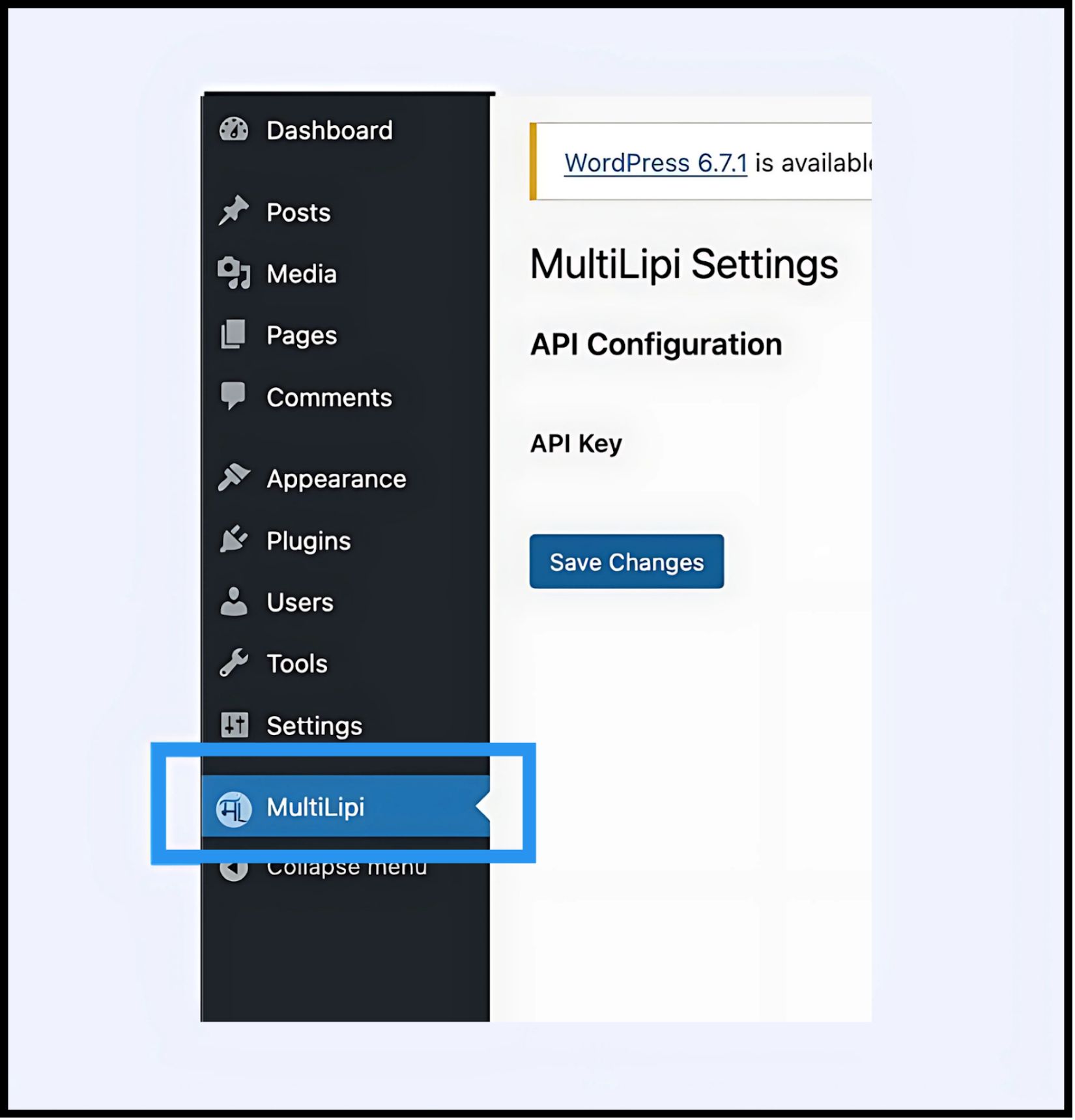
سيظهر عنصر قائمة جديد بعنوان MultiLipi تحت القائمة الرئيسية الخاصة بك الإعدادات علامة التبويب.
3. الخطوة 2: إنشاء اتصال API
يجب عليك المصادقة على المكون الإضافي لربط موقعك بمشروع MultiLipi الخاص بك.
- 1
انتقل إلى الإعدادات > MultiLipi.
- 2
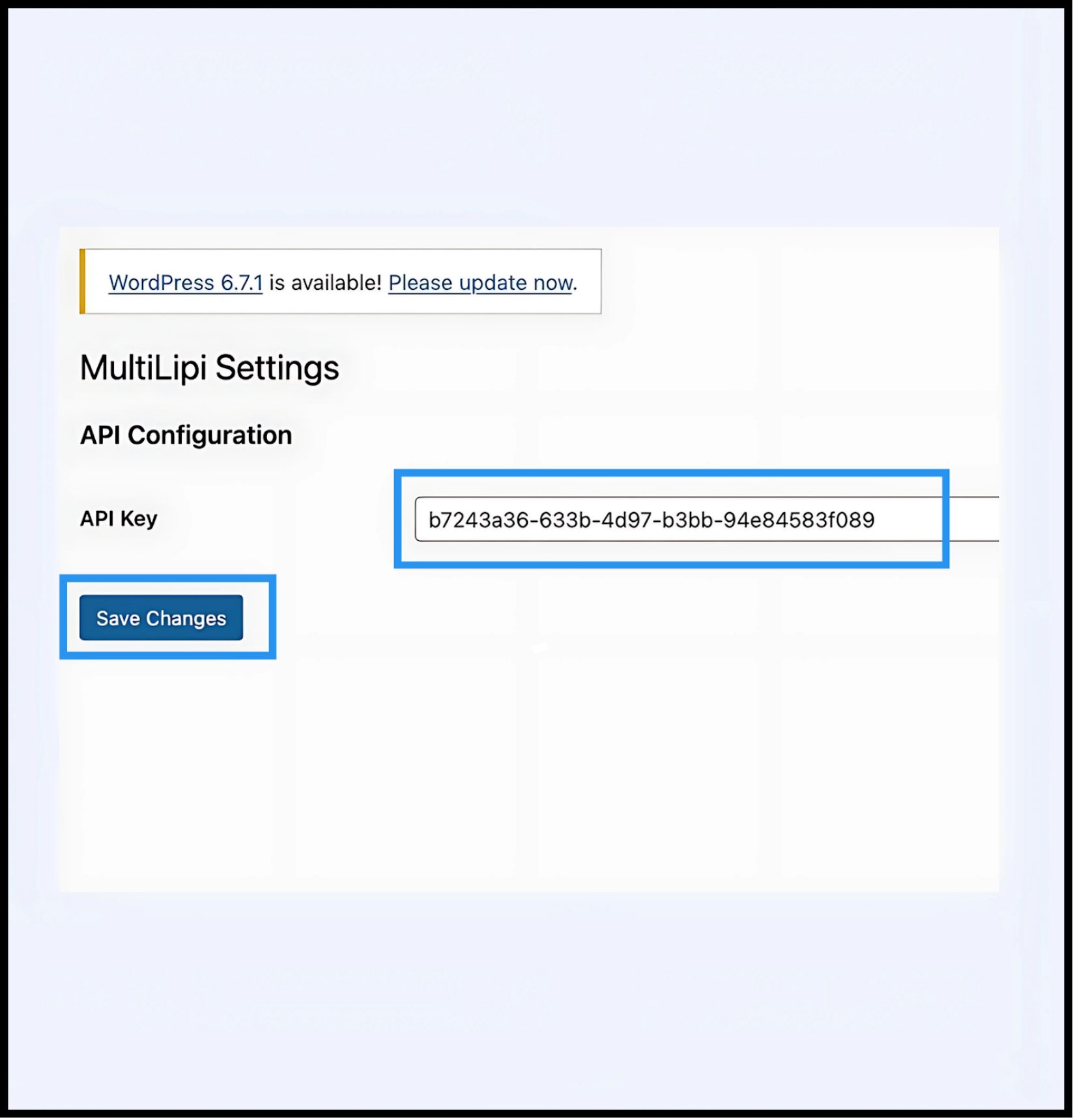
تكوين API: تحديد موقع مفتاح واجهة برمجة التطبيقات الحقل.
- 3
المصادقة: الصق مفتاح API الفريد لمشروعك (الذي نسخته من لوحة تحكم MultiLipi الخاصة بك).
- 4
التزام: انقر حفظ التغييرات.
النتيجة
يتحقق المكون الإضافي من المفتاح وينشئ اتصالاً آمنًا بمحرك الترجمة.
4. الخطوة 3: التحقق من الحافة
بمجرد المصادقة، تصبح طبقة الترجمة نشطة على الفور.
إعادة تحميل
قم بزيارة موقعك العام.
فحص مرئي
يجب أن يظهر محول اللغات في الزاوية السفلية اليسرى (الموضع الافتراضي).
اختبار وظيفي
قم بتبديل اللغات وتحقق من ترجمة المحتوى على الفور.
بروتوكول استكشاف الأخطاء وإصلاحها
- •مسح ذاكرة التخزين المؤقت: إذا كنت تستخدم مكونات إضافية لذاكرة التخزين المؤقت (مثل WP Rocket أو W3 Total Cache) أو ذاكرة تخزين مؤقت من جانب الخادم (مثل Varnish أو Nginx)، فيجب عليك مسح ذاكرة التخزين المؤقت الخاصة بك بعد التثبيت ليظهر المحول.
- •فحص التعارض: تأكد من عدم تنشيط أي إضافات ترجمة أخرى (مثل WPML أو Polylang) على نفس الصفحات، فقد تتعارض مع حقن DOM.
5. إدارة ما بعد النشر
مع تنشيط الإضافة، تتم مزامنة موقع WordPress الخاص بك الآن مع البنية التحتية الخاصة بنا.
مسرد ومحسنات محركات البحث
لا تحتاج إلى إدارة الترجمات داخل WordPress. قم بتسجيل الدخول إلى لوحة تحكم MultiLipi الخاصة بك لتحديد قواعد المسرد، وتكوين علامات Hreflang، وإدارة عناوين URL المترجمة.
التجاوزات المرئية
استخدم المحرر المرئي في لوحة تحكم MultiLipi لإصلاح أي مشكلات في التخطيط ناتجة عن توسع النص (على سبيل المثال، بالألمانية أو الروسية).
التحديثات
تنطبق جميع تعديلات الترجمة التي تم إجراؤها في سحابة MultiLipi على الفور على موقع WordPress الخاص بك دون الحاجة إلى تحديث الإضافة أو مسح ذاكرة التخزين المؤقت مرة أخرى.